
Setting up an efficient work-from-home (WFH) or study space in the Philippines requires careful consideration of both physical comfort and environmental challenges. With fluctuating natural light, high humidity, and the occasional seasonal power outage, your choice of task lighting plays a vital role in maintaining productivity and reducing eye strain. The Baseus light ecosystem offers a diverse range of solutions, but finding the right model depends on your specific desk layout, screen usage, and power stability needs. By matching the physical design and technical specifications of these lamps to your daily routine, you can create a comfortable, glare-free workspace that supports long hours of focused tasks.
Essential Lighting Specs for Focus and Eye Comfort
To select the ideal task light, you must first understand the fundamental metrics of visual ergonomics. Relying solely on the aesthetic design of a lamp can lead to inadequate illumination, resulting in headaches, squinting, and premature eye fatigue.
The first metric to evaluate is illuminance, which refers to the amount of light that falls onto a specific surface area. While luminous flux (measured in lumens) indicates the total light output emitted by the source in all directions, illuminance (measured in lux) determines how bright your actual workspace will be. For reading, writing, or detailed computer work, your desk surface should ideally receive between 300 and 500 lux of light. When browsing Baseus product specifications, look for the lux ratings at specific distances—usually measured at 30 to 40 centimeters from the light source—to ensure the lamp can sufficiently illuminate your primary work zone.
Products mentioned in this guide
![Baseus Eye-Care PC Monitor Screen Hanging Light LED Desk Lamp For Computer Brightness Adjustable Reading Lamp [3 Color Temperatures]](https://img.lazcdn.com/g/p/2c5a030a8607e56505983b61a30e3558.jpg_400x400q80.jpg_.webp)
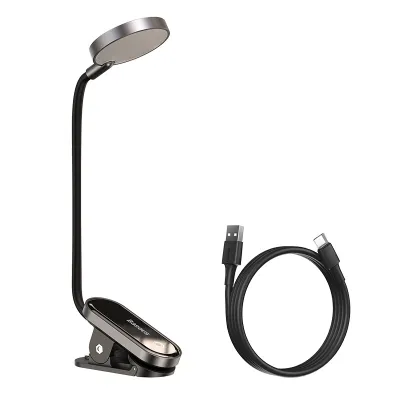
Prices are valid at publication and may change. Please refer to the product page for the latest price.
Color temperature, measured in Kelvin (K), is another critical factor that directly influences your focus and circadian rhythm. Lower color temperatures (around 2700K to 3000K) produce a warm, yellowish light that promotes relaxation and is ideal for casual evening reading or winding down before sleep. Neutral white light (around 4000K) closely mimics natural daylight, making it highly versatile for general study and administrative tasks. Cool white light (5000K to 6500K) offers a crisp, bluish-white illumination that enhances alertness and contrast, which is beneficial during high-focus daytime sessions. Many Baseus models feature adjustable color temperature controls, allowing you to transition between these modes as your tasks change throughout the day. Note that perceived color temperature and its spatial effects are highly subjective preferences, rather than universal indicators of a lamp’s performance.
The Color Rendering Index (CRI), denoted as Ra, measures how accurately a light source reveals the true colors of objects compared to natural daylight. A low CRI can cause colors to appear dull, distorted, or washed out, which is particularly problematic for graphic designers, artists, or anyone working with physical color samples. For standard study and office work, a CRI of Ra 80 or higher is recommended, while color-critical tasks demand a CRI of Ra 90 or above. You can typically find this value printed on the product packaging or listed within the manufacturer’s technical specifications sheet.
Finally, you must address eye safety by looking beyond marketing buzzwords like ‘eye-caring’ or ‘zero strain.’ High-quality task lights utilize direct current (DC) dimming or high-frequency pulse-width modulation (PWM) to minimize visible and invisible flickering, which is a primary cause of silent eye strain and mental fatigue. To verify claims regarding flicker-free operation and blue light filtering, always check for official optical test reports or certifications from recognized third-party testing bodies, such as TÜV Rheinland. Relying on verified certifications ensures that the lamp’s internal circuitry and optical diffusers meet international safety standards.
Which Baseus Design Fits Your Workspace?
Every desk setup is unique, ranging from minimal laptop configurations on shared dining tables to expansive multi-monitor workstations in dedicated home offices. Baseus categorizes its lighting lineup into distinct physical form factors, each engineered to address specific spatial constraints, equipment layouts, and user habits.

Foldable and Clip-On Lamps for Compact Desks
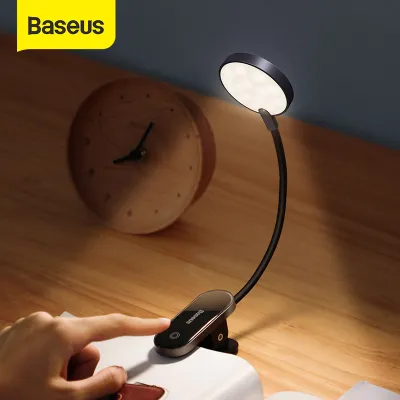
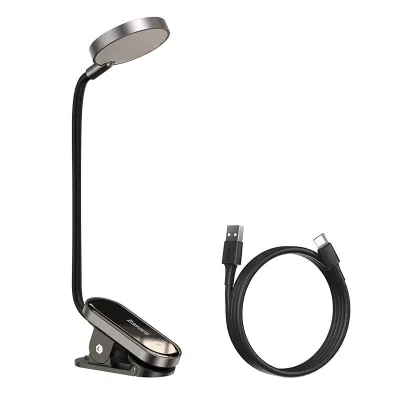
For students living in dormitories, remote workers utilizing temporary tables, or anyone with limited desk real estate, foldable and clip-on lamps offer a highly versatile solution. These compact models prioritize portability and flexibility, allowing you to position the light exactly where it is needed without sacrificing valuable surface space.
One of the primary advantages of these smaller models is the inclusion of built-in rechargeable lithium-ion batteries. In the Philippines, where seasonal tropical storms and grid instability can lead to sudden power interruptions, having a battery-operated light source ensures that your study or work sessions can continue uninterrupted. These models can easily be charged via a standard USB port and moved around the house as needed, serving as reliable emergency lighting when the main power fails.
However, clip-on models require careful physical evaluation before purchase. You must measure your desk’s edge profile and thickness to ensure the clamp can grip the surface securely. Standard clip-on mechanisms typically accommodate thicknesses up to 2 to 3 centimeters, but highly beveled, rounded, or ultra-thick custom tabletops may prevent a secure mount. Additionally, check for protective silicone or rubber padding inside the clamp jaws to prevent the mounting pressure from scratching or indenting delicate wood veneers, glass, or laminate finishes.
The trade-off for this high portability is a more localized light spread. Because the physical dimensions of foldable and clip-on lamps are compact, their light beams are inherently narrower. This makes them excellent for illuminating a single textbook or notebook, but less effective for lighting up a large, multi-device workspace.
Monitor Light Bars for Screen-Heavy Work
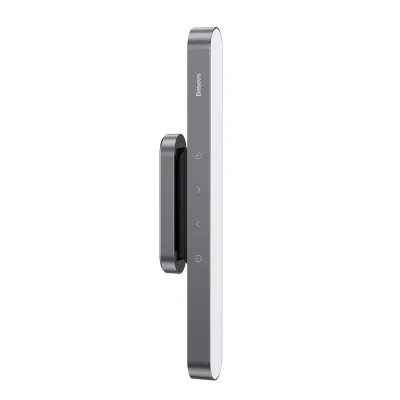
If your daily routine revolves around a desktop computer or a laptop connected to an external monitor, a monitor light bar—also known as a screen hanging light—is often the most efficient choice. These specialized fixtures mount directly to the top frame of your display, projecting light downward onto your keyboard and desk surface while keeping your physical desktop completely clear of lamp bases and cables.
The core engineering achievement of a high-quality monitor light bar is its asymmetric optical design. Traditional desk lamps cast light in a wide cone, which inevitably reflects off the glass surface of your computer screen, creating distracting glare and reducing screen contrast. An asymmetric light bar utilizes a precisely angled reflector or lens to direct the light path strictly forward and downward. This ensures that the light beam illuminates your physical workspace while completely avoiding the screen surface, eliminating glare and significantly reducing eye fatigue during long digital sessions.
Before purchasing a monitor light bar, you must verify its physical compatibility with your specific display. Measure the thickness of your monitor’s top bezel, as well as the depth and shape of the rear casing. Most light bars utilize a gravity-pivot clip or a spring-loaded counterweight mechanism that rests on the top edge of the monitor. If your monitor has an ultra-thin bezel, a highly curved back panel, or a pronounced rear hump, the mounting clip may not sit securely or could potentially obstruct a portion of the screen or a built-in webcam. Furthermore, curved monitors require light bars specifically designed with a matching curvature to ensure the light path does not clip the outer corners of the screen.
Wide-Arm and Base Lamps for Dedicated Study Zones
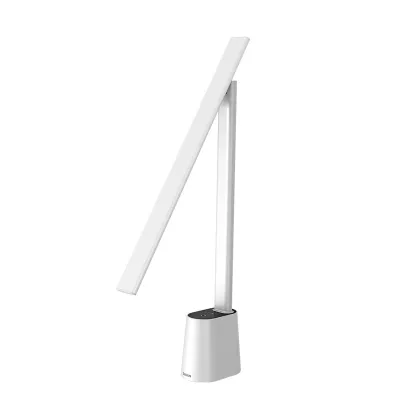
For dedicated study rooms, home offices with spacious desks, and tasks that involve reading large physical textbooks, drafting, or sketching, a traditional wide-arm base lamp remains the gold standard. These fixtures are designed to sit permanently on your desk, providing a robust and highly adjustable lighting platform.
The primary benefit of a wide-arm lamp is its extensive coverage and uniform light distribution. Featuring long, multi-jointed arms and wide LED light heads, these lamps allow you to position the light source high above your workspace, casting a broad beam that illuminates your entire desk surface evenly. This eliminates harsh shadows and high-contrast zones between your reading material and the surrounding environment, which is crucial for maintaining visual comfort during extended reading sessions.
Stability is a critical factor for these larger fixtures. A high-quality wide-arm lamp features a heavy, counterweighted base that prevents the lamp from tipping over when the arm is fully extended. Some models also offer interchangeable mounting options, allowing you to swap the heavy base for a heavy-duty desk clamp to save surface space.
The main trade-off of wide-arm base lamps is their physical footprint and power requirements. Unlike compact clip-on models, these lamps require a permanent spot on your desk and a dedicated power cable route. They are typically heavier, making them less suitable for temporary or highly mobile workspaces, but they offer unmatched lighting performance for dedicated, stationary study zones.
Power Requirements and Electrical Safety Checks
Operating electronic accessories in the Philippines requires a clear understanding of local electrical conditions and product power specifications. To ensure your Baseus light operates safely and efficiently, you must carefully evaluate its power delivery system and verify compatibility with your home’s electrical infrastructure.
First, differentiate between built-in battery models and continuous plug-in models. Battery-powered lamps offer excellent portability but require regular charging cycles. Over time, lithium-ion batteries naturally degrade, a process that can be accelerated by the high ambient temperatures and humidity common in tropical climates. To maximize battery lifespan, avoid leaving battery-operated lamps permanently plugged into a charger while in use, as this can generate excess heat and stress the battery cells.
For continuous plug-in models and monitor light bars, pay close attention to the USB-C or proprietary DC power input requirements. You can locate these specifications on the official product rating label, usually found on the underside of the lamp base or printed directly onto the light bar’s housing. Most Baseus lights require a standard 5V input, but the amperage requirement can vary from 1A to 2A or higher depending on the lamp’s maximum brightness and features.
Using an underpowered wall adapter—such as an older 5V/0.5A phone charger—to power a lamp that demands 5V/2A can lead to several operational issues. The lamp may flicker constantly, fail to reach its maximum brightness, or shut down unexpectedly when switched to cooler, high-intensity light settings. More importantly, drawing too much current from an underpowered adapter can cause the adapter to overheat, creating a potential fire hazard. Always pair your lamp with a high-quality, certified USB wall charger that meets or exceeds the required output specifications.
In the Philippines, the standard household electrical supply is 220V at 60Hz, utilizing Type A (two-prong flat), Type B (three-prong), or occasionally Type C (two-prong round) outlets. Ensure that any AC/DC adapter you plug directly into your wall outlets is rated for 220V input and features local safety certifications.
To maintain a safe workspace, observe the following electrical precautions:
- Avoid Daisy-Chaining: Do not overload single extension cords or power strips by daisy-chaining multiple high-wattage devices alongside your desk lamp.
- Inspect Cables Regularly: Periodically check the USB power cable and connector ports for physical wear, fraying, or loose connections.
- Monitor Operating Temperatures: Touch the power adapter and the base of the lamp occasionally during use. If either component feels unusually hot, disconnect the power immediately and discontinue use.
- Isolate Power During Maintenance: Always unplug the lamp from the power source before cleaning the frame, wiping the diffuser, or moving the fixture.
- Consult Professionals: For any customized desk wiring, grommet installations, or integrated power outlets, always consult a qualified professional electrician to ensure compliance with local electrical codes.
How to Buy Authentic Baseus Lamps and Claim Warranties
Due to the popularity of the Baseus brand, counterfeit products and unauthorized parallel imports are common across various online and physical marketplaces. Purchasing a counterfeit lamp not only deprives you of genuine performance but also poses significant safety risks due to substandard electrical components and uncertified batteries.
To ensure you are purchasing an authentic Baseus light, always buy directly from the brand’s official flagship stores on major ecommerce platforms or from authorized, reputable physical electronics retailers in the Philippines. Genuine products are packaged in high-quality boxes featuring clear printing, official brand logos, and a security scratch-off label. You can scratch off this label to reveal a unique verification code, which can be entered on the official Baseus website to confirm the product’s authenticity.
Understanding your warranty coverage is equally important for long-term peace of mind. Authorized local distributors typically offer a limited warranty ranging from 6 to 12 months, covering manufacturing defects in the LED modules, control circuitry, and charging ports. Note that standard warranties do not cover physical damage caused by drops, liquid exposure, or unauthorized disassembly.
When you receive your lamp, locate the serial number—usually printed on a small sticker on the device or the packaging—and keep your original purchase receipt or digital invoice. In the event of a technical issue or premature battery degradation, contact the authorized seller directly through their official customer support channels to initiate a warranty claim. Keeping the original packaging can often simplify the return and replacement process.
Frequently Asked Questions (FAQ)
Can I power a Baseus desk lamp with a standard power bank?
Yes, most USB-powered Baseus desk lamps and monitor light bars can be powered using a standard portable power bank. This capability is highly convenient during power outages or when working in outdoor spaces. However, you must verify that the power bank’s output port provides the correct voltage and amperage required by your specific lamp model (typically 5V/2A). Connecting the lamp to an underpowered port may result in continuous flickering, dimming, or a complete failure to power on.
Do Baseus desk lamps emit harmful blue light?
Many Baseus desk lamps are designed with built-in blue light reduction features and carry optical safety claims. To verify these claims, check the manufacturer’s product documentation for official test reports or certifications from independent testing organizations. To minimize potential eye strain and sleep disruption during evening study or work sessions, manually adjust your lamp to a warm white color temperature setting (approximately 3000K or lower) and reduce the overall brightness to align with your ambient room lighting.
Community discussion
Share your experience or ask a question. Comments are reviewed before publication.