
Setting up a comfortable home office in the Philippines requires careful attention to your physical environment. With long work-from-home (WFH) sessions often extending from bright, humid mornings into rainy afternoons and late nights, relying solely on overhead room lighting can lead to eye fatigue and reduced productivity. A dedicated LED lamp designed for task lighting is one of the most effective tools to keep your workspace comfortable and highly functional.
Finding the right LED desk lamp involves looking beyond basic aesthetics to evaluate technical specifications. To maintain focus and physical comfort during extended shifts, you must understand how to assess brightness levels, color temperature ranges, physical adjustability, and local power compatibility. This guide breaks down these essential features so you can make an informed decision for your home office.
Brightness and Lumens: Matching Light Output to Your Workspace
When shopping for a modern LED lamp, the first technical specification to understand is the distinction between lumens and watts. In older incandescent lighting, wattage was the primary indicator of brightness. With highly efficient LED technology, wattage only measures power consumption, while lumens indicate the actual volume of light emitted. For a standard home office desk, look for a lamp that delivers between 400 and 800 lumens of light output to ensure your documents and keyboard are clearly illuminated.
Products mentioned in this guide
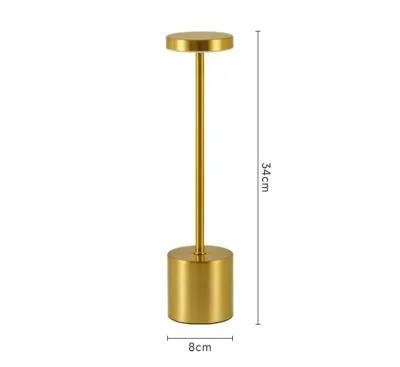
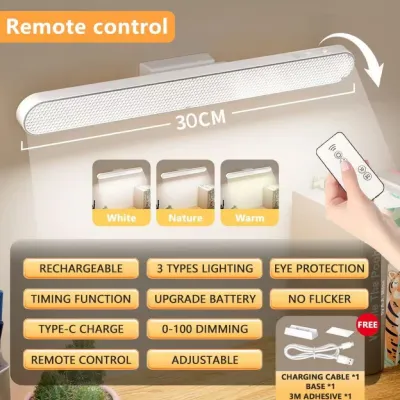
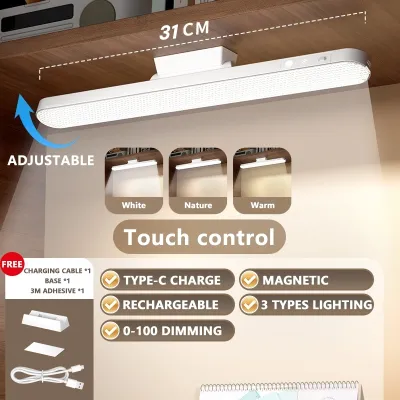
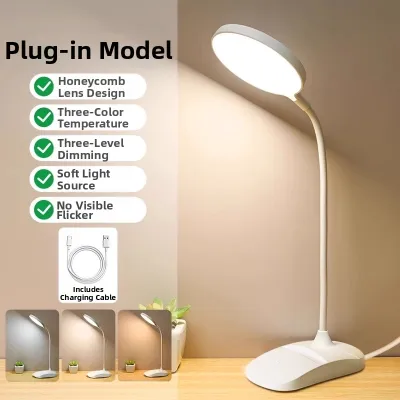
Prices are valid at publication and may change. Please refer to the product page for the latest price.
Adjustability is critical when managing brightness throughout the day. A high-quality desk lamp should feature built-in dimming capabilities, either through step-less touch controls or multiple preset brightness levels. During bright daylight hours, you may only need a subtle fill light to balance shadows cast by nearby windows. At night, you will need to adjust the lamp to a lower, softer setting to prevent harsh contrast against your glowing computer monitor.
Balancing your desk lamp’s output with the ambient lighting in your room is essential for reducing eye strain. Operating a high-brightness lamp in a completely dark room forces your eyes to constantly adjust between the intense pool of light on your desk and the surrounding darkness. To prevent this visual fatigue, use your desk lamp in conjunction with soft ambient room lighting, and adjust the lamp’s dimmer so that the transition between your desk surface and your screen feels natural and seamless.
Color Temperature: Setting the Right Tone for Focus and Wind-Down
Color temperature refers to the visual warmth or coolness of the light emitted by the LED lamp, measured in Kelvin (K). Lower Kelvin ratings, such as 2700K to 3000K, produce a warm, yellowish light that mimics traditional incandescent bulbs and promotes relaxation. Higher Kelvin ratings, ranging from 5000K to 6500K, produce a crisp, cool blue-white light that closely resembles natural daylight and helps stimulate alertness and focus during intense work tasks.

For a versatile WFH setup, prioritize lamps that offer adjustable color temperature controls. This feature allows you to transition the light quality throughout your shift to match your natural daily rhythm. You can utilize a cool, energizing light during morning focus blocks, shift to a neutral white (around 4000K) for afternoon video calls, and wind down with a warm, gentle light during evening administrative tasks without ever needing to swap out a physical bulb.
When comparing options on online marketplaces, look closely at the product specifications sheet for exact Kelvin ranges rather than relying on vague marketing terms like “study mode” or “natural glow.” A reliable manufacturer will clearly state the minimum and maximum Kelvin limits of the fixture. Ensuring the lamp covers a broad spectrum—ideally from at least 3000K to 6000K—guarantees you have the flexibility needed for both high-concentration tasks and evening relaxation.
Adjustability and Ergonomics: Positioning Light to Prevent Glare
The physical design of your desk lamp determines how effectively you can direct light onto your workspace without creating distracting reflections. Gooseneck lamps feature a flexible, rubberized neck that allows for quick, multi-directional bending, though they may have a shorter reach. Articulated or swing-arm designs use mechanical joints and tension springs to provide superior height adjustment and reach, making them ideal for clearing large desktop monitors. Fixed-head lamps offer minimal movement and are generally less suitable for dynamic workspaces.
To prevent glare and eye strain, proper positioning of the light source is essential. The lamp head should ideally be positioned below your eye level and angled so that the light beam casts downward onto your desk surface rather than reflecting directly off your computer screen. If you use a glossy monitor or have a glass-topped desk, an adjustable arm allows you to fine-tune the angle to eliminate harsh reflections that cause squinting and headaches.
Before finalizing your choice, consider the physical footprint and stability of the lamp base. Home office desks in the Philippines often double as storage spaces for laptops, external keyboards, notebooks, and daily essentials. A lamp with a heavy, weighted base ensures the fixture remains stable and will not tip over when you extend the arm. Alternatively, if desktop space is highly limited, look for models that feature a sturdy desk clamp or a space-saving monitor clip-on design.
Flicker, Glare Control, and Power Specifications
Visual comfort during long shifts depends heavily on high-quality light diffusion and stable electronics. Cheap or poorly designed LED lamps can exhibit rapid, invisible flickering that leads to headaches and eye fatigue over several hours of exposure. When browsing product details, check for manufacturer specifications that explicitly mention flicker-free technology. Additionally, look for lamps equipped with a frosted or diffused lens cover, which blends the light from individual LED beads into a soft, even glow and eliminates harsh, overlapping shadows.
Electrical compatibility is another crucial factor to verify before purchasing. In the Philippines, the standard residential electrical supply is 220V at 60Hz, typically utilizing Type A or Type B wall outlets. Ensure the lamp’s power adapter is rated for this voltage range to prevent electrical damage or safety hazards. If you are purchasing an imported model, double-check the plug type and voltage rating on the product listing to confirm it can be safely plugged directly into your home outlets without requiring bulky transformers.
Many modern desk lamps offer USB-powered configurations, allowing you to plug the device directly into a laptop, monitor, or USB hub. While highly convenient and portable, USB-powered models often operate under strict power delivery limits. This means they may not achieve the same maximum brightness or coverage area as a dedicated wall-plug model. If your work requires high-intensity illumination across a large desk surface, a standard AC-powered lamp is generally the more reliable choice.
Building Your WFH Desk Lamp Shortlist
To find the ideal lighting solution for your home office, compile a shortlist of options based on a clear set of functional criteria. Your primary checklist should include adjustable lumen output, a customizable Kelvin range, and a flexible physical arm that fits your desk layout. Prioritizing these core specifications ensures the lamp will actively support your comfort during long working hours.
Establish a realistic budget in ₱ before you begin shopping. While basic, non-adjustable lamps are highly affordable, investing a bit more in a durable fixture with robust hinge joints and high-quality LED chips is a practical decision for daily professional use. When purchasing from online stores, take the time to review the seller’s warranty terms and return policies to protect your investment against manufacturing defects.
Finally, rely on verified customer reviews to gauge real-world performance. Look specifically for feedback regarding long-term durability, the responsiveness of touch controls over time, and whether the actual brightness matches the product descriptions. Pay attention to reviews from users who mention using the lamp for extended daily shifts, as their experiences will give you the most accurate picture of how the fixture performs under realistic work-from-home conditions.
Frequently Asked Questions (FAQ)
Do I need a smart LED desk lamp for working from home?
Smart features such as mobile app integration, voice control, and automated scheduling can add convenience to your daily routine, but they are not essential for a productive WFH setup. Manual touch buttons or physical dials are often faster and more reliable for making quick adjustments during a busy workday. Keep in mind that smart capabilities require a stable home Wi-Fi connection to function fully and do not inherently improve the core light quality, color accuracy, or eye comfort of the lamp.
Is a higher wattage always better for a desk lamp?
No, a higher wattage is not necessarily better when evaluating modern LED lamps. Wattage simply measures the amount of electrical power the lamp consumes, whereas lumens measure the actual light output. Because LED technology is highly energy-efficient, a well-designed lamp can produce a bright, clear light while consuming very little power. When comparing different models for brightness, always look at the rated lumen output rather than relying on the wattage rating.

Community discussion
Share your experience or ask a question. Comments are reviewed before publication.