
Setting up a productive home office in the Philippines requires more than just a reliable internet connection and an ergonomic chair. For professionals working extended hours, the quality of your workspace illumination directly impacts your daily stamina and long-term eye health.
To minimize eye strain during long work-from-home (WFH) sessions, the ideal desk lamp must offer adjustable color temperature, high color rendering index (CRI), flicker-free performance, and physical glare-reduction features.
Choosing the right LED lamp light solves these issues. In tropical climates where natural daylight fluctuates during intense rainy seasons or bright afternoons, your desk lighting needs to adapt. A poorly chosen light can lead to headaches, dry eyes, and physical fatigue, while a properly specified task light creates a balanced, comfortable visual environment.
Products mentioned in this guide
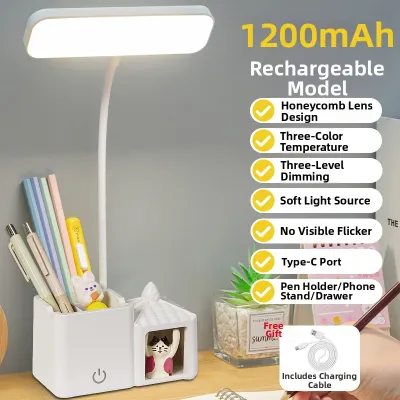

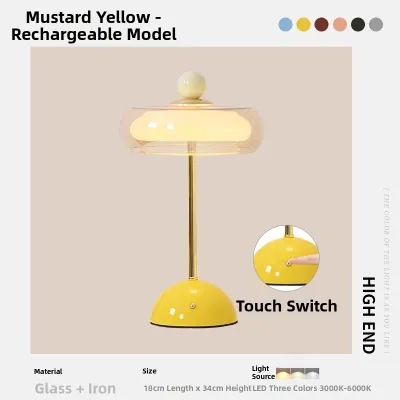
Prices are valid at publication and may change. Please refer to the product page for the latest price.
Quick Guide: Essential Desk Lamp Specs for WFH
When shopping for a desk lamp, the sheer volume of product listings can be overwhelming. To simplify your search, prioritize these four critical optical specifications:
- Adjustable Color Temperature: The ability to switch between warm, neutral, and cool white light to match your working hours and task types.
- High Color Rendering Index (CRI): A metric indicating how accurately the light reveals true colors, which reduces the cognitive strain of reading and viewing physical objects.
- Flicker-Free Design: High-quality internal drivers that eliminate the rapid, invisible pulsing of light that causes subconscious eye fatigue.
- Anti-Glare Diffusion: Physical elements like frosted lenses or louvers that soften the beam and prevent harsh hot spots.
Understanding these metrics prevents the common mistake of buying a fixture that simply blasts maximum brightness. The ultimate goal is to find a lamp light that integrates smoothly with your workspace, adapting dynamically to your ambient environment rather than overpowering it.
Brightness and Illuminance: Finding the Right Lux Level
One of the most frequent points of confusion when selecting a desk lamp is the difference between lumens and lux. Lumens measure the total amount of light emitted by the bulb in all directions. Lux, on the other hand, measures illuminance, which is the amount of light that actually reaches a specific surface area (one lux equals one lumen per square meter). For a WFH setup, lux is the far more practical metric because it dictates how well-lit your actual desk surface will be.

As a general ergonomic guideline, standard reading, writing, and computer tasks are most comfortable when the desk surface receives between 300 and 500 lux. If your work involves highly detailed physical tasks, such as manual drafting, proofreading fine print, or electronics repair, you may want a setup capable of delivering up to 750 lux. Rather than seeking a single fixed output, look for lamps with continuous or multi-step dimming controls so you can adjust the lux level dynamically.
The relationship between your task light and the ambient room lighting is also vital for eye comfort. Using a highly concentrated, bright lamp in a pitch-black room creates a harsh visual contrast every time your eyes drift away from your screen or document. This constant adjustment forces your pupils to dilate and contract repeatedly, accelerating eye strain. For the best comfort, maintain a moderate level of ambient room light and use your desk lamp to gently fill in the shadows on your immediate workspace.
Color Temperature and CRI: Balancing Focus and Eye Comfort
Color temperature, measured in Kelvin (K), describes the warmth or coolness of the light emitted by the lamp. Warmer light tones (ranging from 2700K to 3000K) have a yellow or amber hue that mimics traditional incandescent bulbs. This range is highly relaxing and is ideal for evening work, reading, or winding down, as it minimizes exposure to blue light that can disrupt your sleep cycle.
For active daytime focus, cooler or neutral tones (ranging from 4000K to 5000K) are far more effective. This clean, white light mimics natural daylight, helping to maintain alertness, improve contrast on printed text, and keep you focused during long afternoon stretches. Choosing a lamp light with adjustable color temperature allows you to transition seamlessly from a high-energy daytime setting to a softer, warmer tone as evening approaches.
Alongside color temperature, the Color Rendering Index (CRI) is a critical measure of light quality. Rated on a scale from 0 to 100, CRI indicates how accurately a light source reveals the true colors of objects compared to natural daylight. For long WFH sessions, aim for a desk lamp with a CRI of 80 or higher, with 90+ being the gold standard for design, editing, or intensive reading. Low-CRI light sources make environments look dull, gray, and unnatural, forcing your eyes to work harder to distinguish shapes, text, and subtle color differences.
Flicker-Free and Anti-Glare: Crucial Features for Long Sessions
Many low-quality LED lamps exhibit rapid, high-frequency flickering. While this flicker is often too fast for the human eye to consciously perceive, your brain and optic nerves still detect the rapid changes in light intensity. Over several hours, this invisible pulsing can trigger tension headaches, dry eyes, and general fatigue. To protect your eyes, look for lamps explicitly certified as “flicker-free” or those conforming to recognized optical standards, such as IEEE or IEC guidelines. Avoid relying solely on unverified marketing claims; instead, look for reputable manufacturers who provide detailed technical specifications.
Direct and reflected glare are equally detrimental to long-term comfort. Glare occurs when light shines directly into your eyes or reflects off highly reflective surfaces. High-quality desk lamps combat this by incorporating physical anti-glare features, such as frosted diffusers, honeycomb louvers, or asymmetrical optical designs that direct light at an angle rather than straight down.
To minimize glare in your daily routine, pay close attention to how you position the fixture. Avoid placing the lamp light directly in front of your computer monitor, where it can bounce off the screen and wash out the display. Instead, position the light source to the side of your monitor and angle the head so that the light illuminates your keyboard and physical documents without reflecting off glossy screens, glass desk mats, or coated paper.
Ergonomics and Adjustability: Positioning Your Lamp Light
A desk lamp’s physical construction is just as important as its optical performance. Look for lamps featuring highly adjustable mechanical arms, dual-hinge designs, and rotating or swiveling heads. These articulation points allow you to direct the light precisely where it is needed, adapting to different tasks throughout the day and preventing awkward physical postures that lead to neck and shoulder strain.
The ideal ergonomic position for a desk lamp is slightly above your eye level, with the shade angled away from your direct line of sight. This configuration ensures that the light source itself remains hidden from your view while casting an even, shadow-free pool of light across your keyboard, notepad, and desk surface. If you are right-handed, place the lamp on the left side of your desk to prevent your hand from casting shadows while you write; if you are left-handed, place it on the right.
You will also need to choose between a freestanding base and a clamp mount. Freestanding bases are highly portable and easy to reposition, but they require a stable, weighted design to prevent tipping when the arm is fully extended. In compact WFH setups—such as those commonly found in Philippine condominiums or shared study areas—a desk clamp mount is often the superior choice. Clamp mounts secure the lamp directly to the edge of your desk, freeing up valuable desk real estate and allowing you to position the light around large monitors or dual-screen setups.
Overrated Specs: What You Can Safely Ignore
When comparing desk lamps, it is easy to get distracted by inflated specifications and high-tech features that do not actually improve your visual comfort. For example, extremely high wattage is generally unnecessary for modern LED desk lamps. While old incandescent bulbs required 60W or more, highly efficient LEDs require only 5W to 10W to deliver ample brightness for a standard desk. A lamp with excessively high wattage will likely produce too much glare, generate unnecessary heat, and increase your home electricity costs.
Similarly, smart home integrations, built-in wireless charging pads, and integrated Bluetooth speakers are convenience add-ons rather than essential optical features. While a wireless charger can help declutter your desk, it does not contribute to eye health. If you are working on a tight budget, prioritize a lamp with excellent optical quality, a high CRI, and a stable, adjustable arm over gimmicky smart features that inflate the retail price.
Finally, always verify the electrical specifications and safety certifications of any lamp you purchase. In the Philippines, household electrical outlets operate at 220V at 60Hz. Ensure that the lamp’s power adapter or plug is compatible with this standard and carries local safety markings, such as the Philippine Standard (PS) quality mark or the Import Commodity Clearance (ICC) sticker. Checking these basic electrical parameters before buying ensures your new fixture is safe and reliable.
Frequently Asked Questions (FAQ)
Is a monitor light bar better than a traditional desk lamp for WFH?
Monitor light bars and traditional desk lamps serve slightly different needs. Monitor light bars excel at saving valuable desk space because they mount directly to the top of your screen. They use asymmetrical optical designs to direct light downward, illuminating your keyboard area while completely eliminating screen glare. However, traditional desk lamps with adjustable arms offer far more flexibility. They provide a wider area of illumination, making them the better choice if you frequently read physical books, review printed documents, or need to direct light to different areas of your desk.
How often should I take breaks from my desk lamp light to prevent eye strain?
Even the most advanced, high-quality desk lamp cannot completely prevent eye strain if you work without interruption. Ergonomists recommend practicing the 20-20-20 rule: every 20 minutes, take a break to look at an object at least 20 feet (about 6 meters) away for at least 20 seconds. This simple habit allows your eye muscles to relax and reset. Additionally, ensure you blink regularly to keep your eyes lubricated, especially in air-conditioned home offices where the air can become dry.

Community discussion
Share your experience or ask a question. Comments are reviewed before publication.