
Setting up a gaming room in a condominium requires balancing vibrant aesthetics with the practical constraints of compact spaces, concrete walls, and shared electrical loads. To choose the right Greenfield LED products, you must evaluate your specific room layout, verify the electrical specifications of your fixtures, and select a combination of flexible LED strips for accent lighting and compatible LED bulbs for overhead illumination. By focusing on key parameters like voltage compatibility, base types, and adhesive limits, you can build an immersive gaming environment that is both safe and visually comfortable.
Assessing Your Condo Space and Gaming Lighting Needs
Condo rooms in the Philippines often feature compact footprints and concrete walls that reflect light differently than drywall. Start by measuring your desk area, the distance from your monitor to the wall, and the overall height of your ceiling. These measurements dictate the length of the LED strips you need and the brightness level required for your overhead bulbs.
Identify your primary lighting zones: the immediate desk area for task lighting, the space behind your screen for bias lighting, and the surrounding walls or ceiling for ambient lighting. Each zone serves a distinct purpose in reducing eye strain and enhancing screen contrast during long gaming sessions.
Products mentioned in this guide
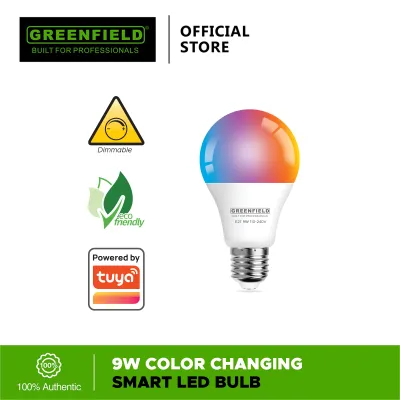
Prices are valid at publication and may change. Please refer to the product page for the latest price.
Evaluate your power infrastructure before purchasing any equipment. Condos often have limited wall outlets, meaning your gaming PC, monitor, console, and sound system may already crowd your power strips. Before adding multiple LED power adapters, calculate the total wattage of your existing devices to ensure you do not overload your extension cords or trip your circuit breakers.
Consider your smart home ecosystem compatibility. If you plan to control your setup via voice commands or mobile apps, verify whether the Greenfield LED products you select support your preferred wireless protocol, such as 2.4 GHz Wi-Fi or Bluetooth, and ensure your condo’s router can handle the additional connected devices.
Evaluating Greenfield LED Strips for Monitor and Accent Lighting
LED strips are the backbone of gaming aesthetics, but their performance depends heavily on proper voltage matching. When browsing Greenfield LED strips, verify whether the kit operates on a 5V USB connection, a 12V adapter, or a 24V system. USB-powered strips are highly convenient for mounting directly behind monitors because they can draw power directly from your PC or console, though they are typically limited in length.

For longer runs along desk edges or ceiling coves, 12V or 24V strips are preferable because they maintain consistent brightness without experiencing voltage drop. Voltage drop causes the far end of the strip to look dimmer or change color. Always check that the included power adapter matches your local 220V grid voltage and provides sufficient amperage for the entire length of the strip.
Color rendering and control methods are critical for achieving the desired visual effect. Look for strips that offer a high Color Rendering Index (CRI) if you also use your desk for content creation or streaming, as this ensures colors look natural on camera. For control, decide between physical infrared remotes, inline controllers, or smart app integration, keeping in mind that app-based systems offer more granular customization for color-cycling effects and brightness levels.
The tropical climate in the Philippines brings high humidity, which can severely compromise standard adhesive backings. When planning your installation, inspect the adhesive tape pre-applied to the Greenfield strip. For concrete condo walls or textured wooden desks, standard tape may fail over time, requiring you to verify if additional mounting clips or specialized double-sided tapes are necessary.
Before making a purchase, measure the perimeter of your monitor or the underside of your desk to determine the exact length needed. Check the product specifications for cuttable intervals—usually marked by copper pads every few centimeters—so you can trim the strip to fit your setup precisely without damaging the internal circuitry.
Selecting Greenfield LED Bulbs for Overhead and Task Lighting
Overhead lighting in typical condos relies on recessed downlights or surface-mounted ceiling fixtures. To upgrade these with Greenfield LED bulbs, you must first verify the existing socket type. The standard screw-in E27 base is the most common in local residential properties, but some modern drop ceilings use GU10 pin bases or smaller E14 threads.
Color temperature plays a dual role in a multi-purpose gaming room. For active gaming or productivity, a cool daylight (around 6000K to 6500K) or neutral white (4000K) helps maintain focus and reduces sleepiness. For casual gaming or winding down, a warm white (2700K to 3000K) or an RGB color-changing bulb creates a more relaxed atmosphere. Selecting a Greenfield bulb with adjustable color temperature allows you to transition seamlessly between these modes.
Wattage and lumen output must match your room’s volume. A typical condo bedroom of 10 to 15 square meters does not require industrial-strength brightness; a bulb emitting 800 to 1000 lumens (roughly equivalent to a traditional 9W to 12W LED bulb) is usually sufficient for general illumination. Avoid over-bulbing your fixtures, and always check the maximum wattage rating printed on your ceiling lamp holder to prevent overheating.
If your condo features built-in wall dimmers, you must exercise caution. Standard LED bulbs can flicker, buzz, or fail prematurely when paired with traditional analog triac dimmers. Verify whether the Greenfield LED bulb is explicitly labeled as dimmable, or opt for smart bulbs that handle dimming internally via an app or remote control while connected to a standard, non-dimming light switch.
Designing a Glare-Free Lighting Layout
An effective gaming room layout prioritizes visual comfort over raw brightness. Placing bright, unshielded light sources directly in your line of sight or where they reflect off your monitor screen causes glare, leading to headaches and eye fatigue.
To establish proper bias lighting, mount Greenfield LED strips directly to the back of your monitor, positioning them a few inches from the edges. This projects a soft glow onto the wall behind the screen, which balances the high contrast between a bright display and a dark room. This simple adjustment helps your eyes adjust more easily during dark in-game scenes.
Organize your lighting into logical zones that can be controlled independently. For example, keep your overhead ceiling bulbs on one circuit for general cleaning or daytime tasks, while grouping your desk strips and accent lights into a “gaming scene” that can be activated with a single switch or app command when it is time to play.
Exposed LED chips produce harsh, pinpoint light dots that can ruin the clean look of your setup and create distracting reflections on glossy surfaces. To resolve this, install your LED strips inside aluminum channels equipped with frosted plastic diffusers. This diffuses the individual light points into a continuous, smooth bar of light, elevating the overall aesthetic of your condo gaming station.
Safe Installation and Condo Rental Considerations
Renting a condo in the Philippines often means strict rules regarding wall damage and paint peeling, which can jeopardize your security deposit. Before sticking any LED strip to a wall, clean the surface thoroughly with isopropyl alcohol to remove dust and oils, and let it dry completely. Avoid applying heavy adhesives directly to cheap flat latex paint, as the bond may pull the paint off the concrete when removed.
When it is time to move out or rearrange your setup, do not rip the LED strips off the wall. Use a hair dryer on a low-heat setting to warm the adhesive, softening it so you can gently peel the strip away. Any remaining sticky residue can be safely dissolved with a mild adhesive remover or soapy water, preserving the wall finish.
Electrical safety must be your top priority when managing multiple light sources. Avoid daisy-chaining power strips or plugging multiple high-draw adapters into a single outlet, as this can create a fire hazard in older condo buildings. Ensure all power bricks are placed in well-ventilated areas where heat can dissipate easily, especially during hot summer months.
If your lighting plan involves modifying fixed ceiling fixtures, replacing wall switches, or tapping into your condo’s main electrical wiring, stop immediately. These tasks carry significant risks of electrical shock or short circuits. Always isolate the power at your unit’s main circuit breaker and hire a qualified professional electrician to handle any hardwired installations.
Frequently Asked Questions (FAQ)
How do I prevent LED strip adhesives from damaging condo paint?
- Surface Preparation: Clean the mounting surface with rubbing alcohol to remove dust, grease, and moisture, ensuring a clean bond without trapping debris.
- Gentle Removal: When removing the strip, apply gentle heat from a hair dryer to soften the adhesive backing before slowly peeling it back at a shallow angle.
- Pre-Installation Test: Apply a small piece of the adhesive tape to an inconspicuous area, such as behind a baseboard, and leave it for 24 hours to check if it damages the paint upon removal.
Can I sync Greenfield LED products with my existing PC or console?
- Software Compatibility: Check if the Greenfield smart lighting app offers integration with popular third-party smart home platforms or open-source lighting synchronization software.
- Hardware Requirements: Some reactive lighting setups require a dedicated HDMI sync box or a USB controller connected directly to your PC to read screen pixels and translate them into light colors.
- Latency and Limits: Be aware that wireless synchronization via Wi-Fi may introduce minor latency compared to direct wired connections, which can affect fast-paced gaming experiences.
Community discussion
Share your experience or ask a question. Comments are reviewed before publication.