
Selecting the right motion sensor features for a solar security wall light requires balancing detection accuracy, coverage area, and energy conservation. To secure your home effectively, you must look for a sensor with a detection range and angle that match your specific property layout, adjustable sensitivity to prevent false triggers from wind or animals, and integrated lighting modes that preserve battery life. By focusing on these core specifications, you can ensure your outdoor lighting provides reliable illumination precisely when an intruder approaches, without draining its stored solar power prematurely.
Assess Your Property's Security Needs First
Before comparing technical specifications on a product box, you must evaluate the physical layout of your property. Walk around your home to identify vulnerable entry points, such as dark side alleys, garage doors, back patios, or the main front gate. Each of these zones presents unique monitoring challenges; a narrow walkway squeezed between high concrete walls requires a different detection pattern than a wide, open driveway.
You must also account for environmental factors that could interfere with a motion sensor. In tropical climates like the Philippines, lush landscaping with swaying banana leaves, palm fronds, or hanging ornamental plants can easily trigger sensitive sensors during afternoon breezes. Similarly, if your wall light faces a busy street with passing vehicles or neighborhood pets, a poorly configured sensor will trigger constantly, draining the battery before midnight.
Products mentioned in this guide
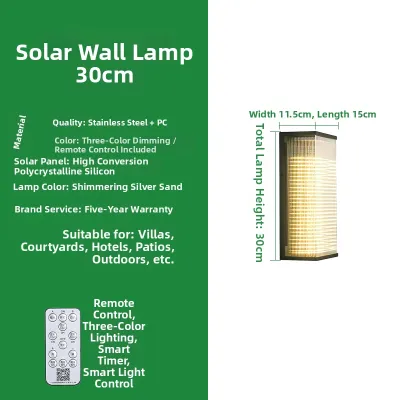
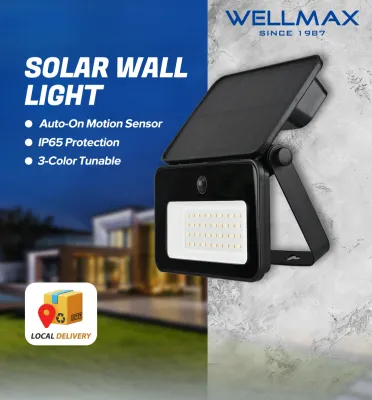
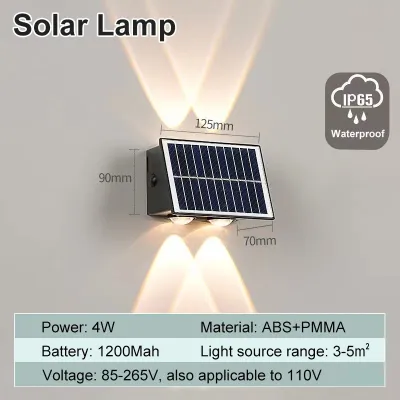
Prices are valid at publication and may change. Please refer to the product page for the latest price.
Finally, determine what you want the light to accomplish when it detects movement. If your primary goal is visual deterrence, you will want a sudden, high-intensity blast of light to startle potential intruders. If you simply want safe passage to your front door, a softer, progressive illumination that guides your steps might be more appropriate.
Key Motion Sensor Specifications to Evaluate
Understanding how motion sensor hardware operates helps you select a fixture that aligns with your property’s physical layout. Most solar security wall lights utilize Passive Infrared (PIR) sensors, which detect changes in infrared radiation—essentially heat signatures—moving across their field of view. When a person, animal, or vehicle crosses this invisible grid, the sensor registers the temperature difference and triggers the light.

Because PIR sensors rely on thermal contrast, their performance is directly tied to how well their hardware specifications match the mounting environment. Evaluating these metrics systematically ensures you do not end up with a light that either ignores human movement or triggers at every gust of warm wind.
Detection Range and Angle
Detection range refers to the maximum distance from the sensor at which movement can be detected, typically measured in meters. You must match this range to your planned mounting height and the length of the area you need to monitor. If you mount a light too high on a second-story wall, a sensor with a short detection range may fail to register movement at ground level, creating a significant security blind spot.
The detection angle, measured in degrees, determines the width of the sensor’s field of view. A wide-angle sensor, often ranging from 120 to 180 degrees, is ideal for broad areas like open backyards or wide carports where an intruder could approach from multiple directions. Conversely, a narrower detection angle is preferable for side pathways or properties built close to neighbors, as it prevents the sensor from triggering every time someone walks by on the adjacent property or public sidewalk.
Always verify that the manufacturer’s specified detection zone matches your physical space. Check the product packaging or manual for a detection diagram, which illustrates how the sensor’s sensitivity behaves at different distances and angles, allowing you to plan the exact mounting location before drilling holes.
Sensitivity and Pet Immunity
Adjustable sensitivity is a crucial feature for minimizing false alarms and ensuring reliable performance. In warm, humid tropical environments, the ambient air temperature can closely approach human body temperature, which sometimes reduces the thermal contrast detected by PIR sensors. Having a physical dial or digital setting to adjust sensitivity allows you to fine-tune the sensor to account for seasonal temperature shifts and local weather patterns.
If you have outdoor pets or live in an area with stray animals, look for sensors featuring pet immunity. These sensors are designed to ignore heat signatures below a certain physical size or manufacturer-specified weight threshold, such as small dogs or cats. This feature prevents your security light from turning on and off repeatedly throughout the night due to animal activity, preserving battery life for actual security threats.
After installing your solar wall light, plan a simple walk-test routine to fine-tune the settings. Walk across the detection zone at a normal pace at different times of the day and night, adjusting the sensitivity control until the light triggers reliably for human movement while ignoring minor environmental disturbances like wind-blown debris.
Lighting Modes and Sensor Integration
A solar security light’s motion sensor does not work in isolation; it must integrate seamlessly with the fixture’s operating modes to balance security with battery preservation. Because solar lights rely entirely on stored sunlight, continuous high-intensity illumination is rarely sustainable, especially during the rainy season when overcast skies limit daily charging.
Most modern solar wall lights offer three primary operational modes. The first is a motion-activated-only mode, where the light remains completely dark until the sensor detects movement, at which point it shines at full brightness for a set duration before turning off. This mode offers the highest level of security deterrence and is the most energy-efficient option, making it ideal for consecutive cloudy days.
The second common option is a dim-to-bright mode, where the light maintains a low, continuous ambient glow throughout the night and boosts to maximum brightness only when the sensor is triggered. While this provides excellent continuous pathway visibility, it places a higher demand on the battery. The third mode is continuous dusk-to-dawn illumination at a fixed brightness without sensor interaction, which is generally unsuitable for security purposes due to rapid battery depletion.
To ensure reliable operation, you must select a light with a battery capacity (measured in milliampere-hours or mAh) and a solar panel wattage that can support your chosen operating mode. For high-traffic areas or dim-to-bright configurations, prioritize fixtures equipped with high-efficiency monocrystalline solar panels and robust lithium-ion batteries to ensure the light has enough stored energy to last through the longest, darkest nights.
Installation and Environmental Considerations
Proper physical installation is just as important as choosing the right technical specifications. To maximize solar charging, you must mount the fixture in a location where the solar panel receives direct, unobstructed sunlight for several hours daily, keeping it clear of roof overhangs, tree canopies, or adjacent building shadows.
Simultaneously, you must position the motion sensor so it points directly at the target zone without creating ground-level blind spots. Avoid mounting the fixture too high or tilting it at an extreme angle that points the sensor toward the horizon, as this can cause the sensor to miss nearby activity while triggering from distant, irrelevant movement.
There are several environmental hazards you must avoid when choosing a mounting location. Do not install PIR motion sensors near air conditioning compressors, outdoor kitchen vents, or other heat-emitting appliances, as the sudden drafts of warm air will trigger false alarms. Additionally, avoid pointing the sensor directly at highly reflective surfaces like glass windows or swimming pools, which can bounce sunlight and heat signatures, confusing the sensor’s internal logic.
For safety during installation, always use a stable, secure ladder when working at heights, and ensure the mounting surface is strong enough to withstand strong winds or tropical storms. If your chosen security light features any hybrid electrical wiring or auxiliary power connections, always isolate the power source at the breaker before handling the wires, or hire a qualified professional to complete the electrical installation safely.
Frequently Asked Questions (FAQ)
Can a solar motion light work effectively on cloudy days?
Yes, solar panels can still charge under cloudy or overcast skies by utilizing diffuse sunlight, though their charging efficiency is significantly reduced compared to direct sunlight. To maintain reliable security performance during consecutive rainy days, you should switch the light to a motion-activated-only mode, which conserves the battery’s stored energy by keeping the light off until movement is detected.
How do I clean the motion sensor without damaging it?
To clean the motion sensor, gently wipe the plastic sensor dome with a soft, damp microfiber cloth and a mild, non-abrasive soap solution to remove dust, pollen, and dried water spots. Avoid using harsh chemical solvents, abrasive scrubbing pads, or high-pressure water sprays, as these can scratch or cloud the delicate plastic lens, permanently degrading the sensor’s detection range. For safety and convenience, perform this maintenance during low-light hours or temporarily cover the solar panel to prevent the light from constantly triggering while you clean.
Community discussion
Share your experience or ask a question. Comments are reviewed before publication.