
Working or studying from home often means spending long hours in front of a computer screen, frequently stretching late into the night. If you find yourself finishing the day with dry, irritated eyes, persistent headaches, or physical fatigue, your desk lighting setup is likely the primary culprit. While traditional desk lamps have been the standard solution for decades, they often introduce as many problems as they solve, from casting harsh screen reflections to consuming valuable desk space.
A monitor light bar is a specialized architectural task light designed to mount directly to the top of your display, projecting a precise beam of light downward onto your workspace without reflecting off the screen. It is an excellent investment if you struggle with screen glare, experience eye strain during late-night sessions, or work on a compact desk where space is at a premium. However, it is not a universal solution for every workspace. If you primarily read physical textbooks away from your screen, or if you use a highly curved or ultra-thin OLED monitor, alternative lighting solutions might serve you better. Understanding how these devices interact with your physical environment, your screen technology, and your daily habits will help you determine if a monitor light bar is the right addition to your setup.
Signs Your Current Desk Lighting Is Causing Eye Strain or Glare
Identifying whether your current lighting setup is failing you requires looking closely at both your physical comfort and the visual environment of your workspace. One of the most common issues in home offices is screen glare, which occurs when overhead ceiling fixtures, unshaded windows, or poorly positioned lamps bounce light directly off your monitor screen and into your eyes. This reflection acts as a visual obstacle, forcing your eyes to constantly adjust between the text on the screen and the bright reflection on the glass surface. In typical residential spaces, especially during bright tropical afternoons, this contrast can become incredibly distracting and tiring.
Products mentioned in this guide

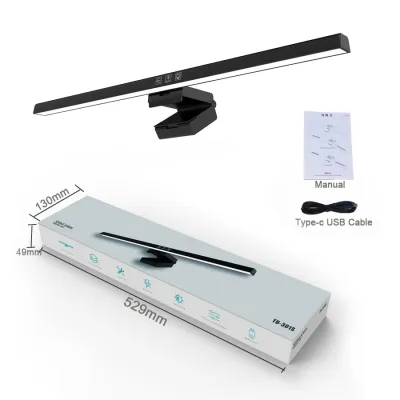
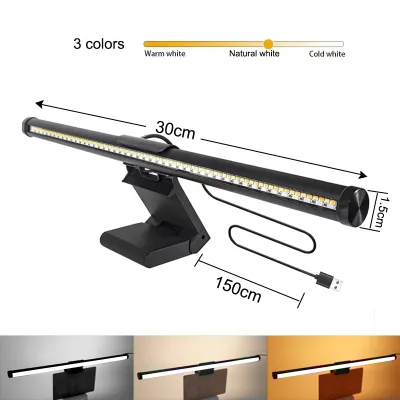
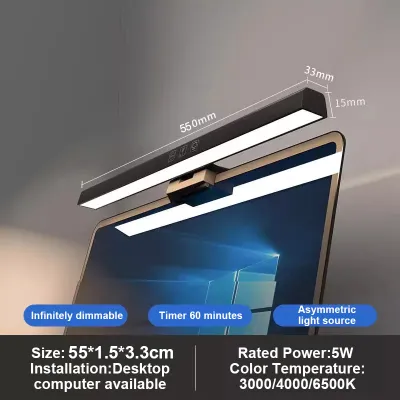
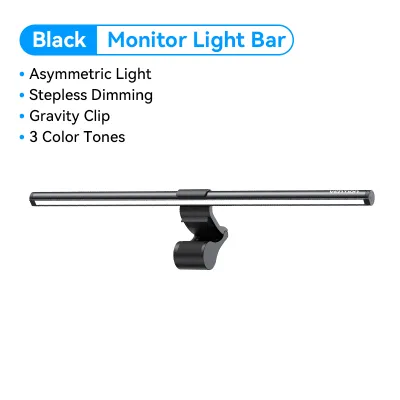
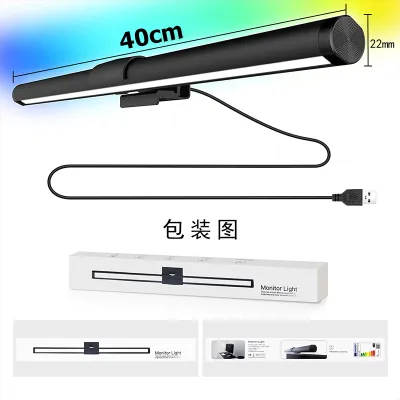
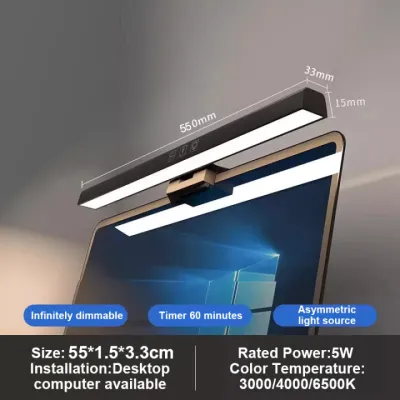
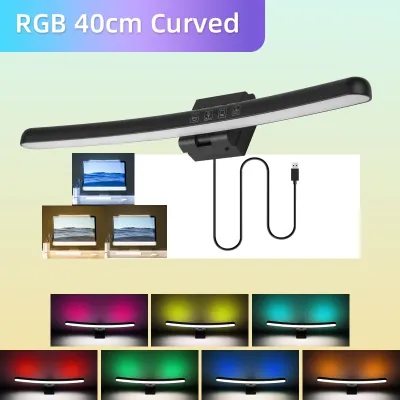
Prices are valid at publication and may change. Please refer to the product page for the latest price.
Over time, this constant visual adjustment leads to physical symptoms of eye strain, medically known as asthenopia. You might experience dry eyes, a gritty sensation under your eyelids, frequent squinting, or tension headaches concentrated around your temples and forehead after a long study or work session. These symptoms are often exacerbated by a lack of balanced ambient light. When you work in a dark room with only the bright glow of your monitor to illuminate your face, your pupils must constantly dilate and contract as you look between the bright screen and the dark desk surface, leading to rapid muscle fatigue.
Furthermore, insufficient or uneven task lighting can make physical work on your desk highly uncomfortable. If your current lamp is positioned to the side, it likely casts harsh, long shadows across your keyboard, notepad, or mouse pad every time you move your hands. This uneven illumination forces you to strain your eyes just to read handwritten notes or locate keys.
Finally, physical clutter is a major pain point for many remote workers and students. Traditional desk lamps require bulky bases or heavy articulated arms to remain stable. On a standard compact desk, which often measures only 80 to 120 centimeters in width, a lamp base can consume a massive portion of your usable surface area, restricting your movement and leaving little room for notebooks, reference materials, or external peripherals.
How a Monitor Light Bar Actually Fixes Desk Lighting Issues
To understand why a monitor light bar is highly effective, it is necessary to look at the physics of its optical design. Unlike standard desk lamps that project light in a symmetrical cone, a high-quality monitor light bar utilizes an asymmetrical optical design. Inside the bar, a custom-engineered reflector or specialized lens shapes the light beam into an off-center wedge. This wedge projects light forward and downward at a precise angle, typically around 45 degrees, creating a clean physical cutoff line. Because the light is directed entirely in front of the screen, none of the light rays hit the display glass directly, completely eliminating screen glare while keeping your keyboard and desk brightly lit.

This mounting position also offers a major physical advantage. By utilizing a gravity-counterweight or spring-loaded clip that sits securely on the top bezel of your monitor, the light bar occupies zero desk real estate. It elevates the light source completely off your working surface, freeing up the premium space directly below your screen. This allows you to slide your keyboard back, spread out large textbooks, or position reference documents directly in front of you without navigating around a heavy metal lamp base.
Additionally, modern monitor light bars feature highly adjustable settings for both brightness and color temperature, allowing you to customize the light output to suit your physiological needs throughout the day. For daytime focus and high-productivity study sessions, you can select a cool white light (around 5000K to 6500K), which mimics natural daylight and helps suppress melatonin production, keeping you alert. Conversely, during late-night work, you can transition to a warm, amber light (around 2700K to 3000K) to reduce blue light exposure, creating a relaxing environment that supports your natural circadian rhythm and prepares your body for sleep.
When Investing in a Monitor Light Bar Makes Sense
A monitor light bar is not just a stylish accessory; it is a highly functional tool that excels under specific environmental conditions and workspace layouts. Deciding to invest in one depends heavily on your physical desk size and the complexity of your computer setup.
Small or Cluttered Workspaces
If you work from a compact desk, a shared family table, or a tight dorm room, maximizing every square centimeter of surface area is critical. Traditional desk lamps, even those with clamp mounts, require a physical anchor point that can interfere with desk organization. A monitor light bar completely bypasses this limitation by utilizing the top of your monitor, a space that is otherwise entirely unused.
This design is incredibly beneficial for students and professionals who need to keep multiple physical items within arm’s reach. Whether you are taking handwritten notes alongside your keyboard, referencing heavy physical textbooks, or using specialized input devices like drawing tablets or audio mixers, the light bar provides clean, overhead illumination. Because the light source is centered directly above your primary workspace, it casts minimal shadows from your hands, ensuring your physical reading and writing areas remain perfectly legible.
Multi-Monitor or Ultrawide Setups
For users with ultrawide screens or multi-monitor configurations, achieving even lighting across the entire workspace is a notorious challenge. A single traditional desk lamp placed on one side of a wide desk will inevitably create an uneven pool of light, leaving one half of your workspace brightly illuminated while the other half remains cast in deep shadow. This stark contrast forces your eyes to constantly adapt to different light levels as you glance across your screens, accelerating eye fatigue.
Using a longer monitor light bar, or mounting dual light bars on a multi-monitor setup, provides a continuous, uniform sweep of light across the entire width of your desk. This wide distribution of light eliminates harsh contrast zones, smoothing out the transition between your screens and your physical desktop. By creating a balanced visual plane, a light bar helps maintain comfortable, strain-free viewing across your entire field of vision.
When You Should Skip the Monitor Light Bar Entirely
While monitor light bars offer clear advantages, they are not a universal solution. Certain hardware configurations and environmental conditions make a light bar impractical, physically incompatible, or simply unnecessary.
Incompatible Monitor Designs
Before purchasing, you must carefully evaluate the physical construction of your monitor, as some modern designs are completely incompatible with standard light bar clamps. For instance, ultra-thin bezels present a significant risk. Many modern displays, particularly premium OLED panels, feature bezels that are only a few millimeters wide. A heavy gravity clamp or spring-loaded mount can press directly against the fragile display glass rather than the protective bezel, creating concentrated pressure points that can crack the screen or permanently damage the underlying pixels. Always consult your monitor manufacturer’s physical specifications and safety guidelines regarding top-bezel pressure limits.
Physical obstructions on the top bezel can also prevent secure mounting. If your monitor features a built-in pop-up camera, a prominent brand logo, or if you use an external webcam for daily video calls, a light bar will likely block these devices or fail to sit flush. Furthermore, heavily curved gaming monitors (such as those with a 1000R or 1500R curvature) present a geometry problem. A standard straight light bar mounted on a deeply curved screen will often block the top corners of the display or project light directly onto the curved outer edges of the screen, creating the exact glare you are trying to avoid.
Sufficient Ambient or Existing Task Lighting
If your workspace is already blessed with well-designed, balanced lighting, adding a monitor light bar may provide little to no practical benefit. In rooms with ample, diffused ambient light—such as spaces with indirect LED cove lighting, wall-facing uplights, or well-managed natural light—the contrast between your screen and the surrounding environment is already minimized.
Similarly, if you already own a high-quality, modern architectural desk lamp with an articulated arm and a high-performance anti-glare diffuser, you likely do not need to replace it. When positioned correctly—slightly to the side, angled downward, and elevated above eye level—a premium desk lamp can provide excellent, shadow-free task lighting that matches the performance of a light bar without requiring you to mount hardware to your screen.
Practical Lighting Alternatives to Consider First
Before spending money on new hardware, there are several highly effective, low-cost adjustments you can make to your existing environment to alleviate eye strain and glare.
First, analyze the physical positioning of your current desk lamp and monitor. If you are experiencing screen reflections, try moving your lamp to the opposite side of your desk, or adjust its height so the bulb is completely shielded from your direct line of sight. If the glare is caused by a window, try angling your desk at a 90-degree angle to the window rather than facing it or sitting with your back to it, and use adjustable blinds or curtains to diffuse direct sunlight during peak afternoon hours.
Second, consider installing bias lighting. This involves mounting a simple, inexpensive LED strip to the back of your monitor, projecting light backward onto the wall behind your screen. Bias lighting is incredibly effective at reducing eye strain in dark rooms because it raises the average ambient light level of your immediate surroundings. This reduces the harsh contrast between the self-luminous display and the dark wall behind it, allowing your pupils to remain at a stable, comfortable dilation level without casting any light onto the screen itself.
Finally, if you decide you do need a dedicated task light but want to keep your monitor clear, look into an articulated LED desk lamp with a C-clamp mount. These lamps clamp directly to the back or side edge of your desk, lifting the light source completely off your working surface just like a light bar. Their long, adjustable arms allow you to position the light head precisely where you need it, and modern models often feature built-in honeycomb diffusers that soften the light and eliminate harsh shadows.
What to Verify Before Mounting a Light Bar to Your Screen
If you decide that a monitor light bar is the right choice for your setup, you must verify several technical and physical specifications before making a purchase to ensure safety, compatibility, and optimal performance.
- Power Source and Voltage Verification: Most monitor light bars are powered via a USB connection. You must verify the power output of the USB port you plan to use, whether it is on your monitor, PC tower, or a dedicated wall adapter. A standard light bar typically requires a stable 5V/1A (5W) or 5V/2A (10W) power supply. If you plug the device into an underpowered USB port (such as an older 5V/0.5A port common on older monitors), the light bar may flicker, fail to reach maximum brightness, or shut down unexpectedly. Always check the manufacturer's input requirements and use certified power adapters to prevent electrical hazards.
- Mounting Clearance and Bezel Depth: Measure the thickness of your monitor's top bezel and the depth of the cabinet behind it. Gravity-counterweight clamps require a minimum flat or gently sloped surface on the back of the monitor to balance securely. If your monitor has a highly sculpted, angular, or stepped back panel, a standard gravity clamp may slip. Ensure the front lip of the clamp is shallow enough that it does not overlap the active display area of your screen.
- Control Interface Preferences: Light bars offer various control methods that impact daily usability. Touch-sensitive buttons on the bar itself are common, but pressing them can cause your monitor to wobble or shift. If you prefer a highly stable setup, look for models that feature a dedicated desktop dial. These dials can be wired or wireless, allowing you to adjust brightness and color temperature smoothly from your desk surface without touching the monitor.
- Weight, Pressure, and Padding Limits: Ensure the light bar's mounting mechanism features soft, high-friction silicone or rubber padding on all contact points. This padding protects your monitor's plastic housing and glass from scratches and absorbs vibrations. If your monitor is mounted on a mechanical gas-spring monitor arm, verify that the arm has enough tension headroom to support the additional weight of the light bar (typically 400 to 800 grams) without drooping.
Frequently Asked Questions (FAQ)
Can a monitor light bar cause screen glare?
A high-quality monitor light bar engineered with a true asymmetrical optical design will not cause screen glare. It projects light downward and forward, keeping the screen surface completely in the dark. However, budget-grade models often use cheap, symmetrical LED arrays that scatter light in all directions. These low-end models will throw light directly onto the screen glass, creating distracting reflections and defeating the primary purpose of the device.
Do monitor light bars work on curved screens?
Yes, but compatibility depends on the specific model and the curvature of your screen. Standard straight light bars can be used on mild curves (such as 1800R), but on deep curves (like 1500R or 1000R), a straight bar may block the top corners of the display or project light onto the screen edges. For deeply curved screens, it is highly recommended to use a specially designed curved monitor light bar or a model with an extended, adjustable gravity mount that sits further forward.
Is a monitor light bar better than a regular desk lamp for studying?
The answer depends on your primary study medium. If your studying is screen-centric—involving typing, reading digital PDFs, or coding—a monitor light bar is superior because it eliminates glare and illuminates your keyboard area perfectly. However, if your study habits involve reading large physical textbooks, highlighting printed papers, or sketching on a large notepad positioned away from your monitor, a traditional articulated desk lamp is often better, as it can be easily angled to project light directly onto your physical reading materials.
Community discussion
Share your experience or ask a question. Comments are reviewed before publication.