
Creating a calm, restful bedroom environment is essential for maintaining physical and mental well-being. In the bustling urban centers of the Philippines, where external noise and light pollution from streetlights or adjacent high-rises can easily seep into your sleeping space, establishing a personal sleep sanctuary is more important than ever. A projector night light galaxy has emerged as a popular tool for transforming plain bedroom ceilings into soothing, cosmic vistas. However, not all projectors are designed with sleep hygiene in mind. Some models are built primarily for lively parties, featuring rapid transitions, intense flashing lights, and loud internal motors that can actually hinder your ability to fall asleep.
To find a galaxy projector that truly supports your sleep cycle, you must look beyond the visual appeal of the projections. The most effective sleep-friendly devices prioritize specific, functional features: adjustable auto-off timers, multi-level or stepless brightness dimming, warm color spectrums, and whisper-quiet motors. In tropical climates like the Philippines, where bedrooms are often kept sealed for air conditioning or exposed to high humidity, secondary factors such as efficient heat dissipation and robust electrical safety certifications are also critical. Understanding how these features interact with your body’s natural sleep signals will help you choose a device that promotes deep, uninterrupted rest rather than nighttime stimulation.
Auto-Off Timers: Protecting Your Sleep Cycle from Light Disruption
The human body relies on external cues, primarily light and darkness, to regulate its internal circadian rhythm. When your environment transitions from light to dark, your brain receives a signal to begin winding down for sleep. Introducing continuous ambient light throughout the entire night can disrupt this natural cycle. Even when your eyes are closed, your eyelids are thin enough to allow light to penetrate, which can subtly signal the brain that it is still daytime. This exposure can prevent you from entering deeper, more restorative stages of sleep, leaving you feeling fatigued in the morning. Therefore, an automatic shut-off mechanism is the single most critical feature of any sleep-focused galaxy projector.
Products mentioned in this guide
![[erbingz]12 in 1 USB HD Galaxy Star Projection Lamp Night LED Atmosphere Light Plug & Play Star Projector LED Nightlight Lamp](https://img.lazcdn.com/g/p/ca79f119dfa08ef8f33b0fc34a51047d.jpg_400x400q80.jpg_.webp)
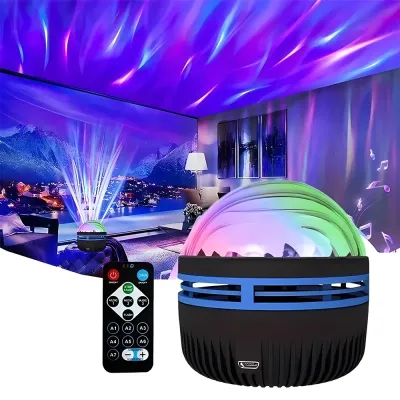
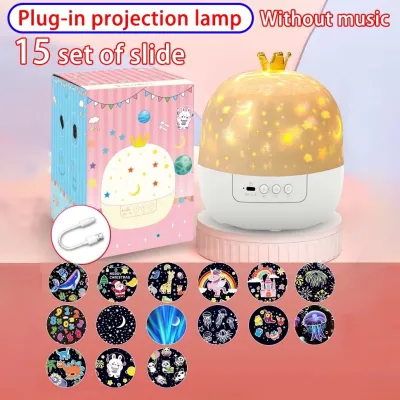
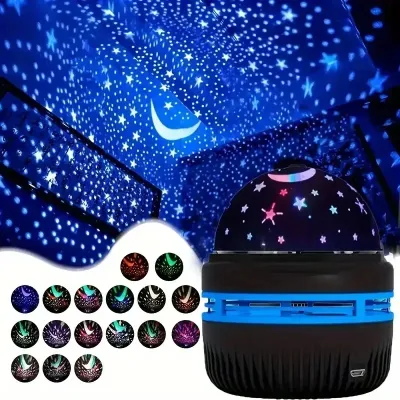
Prices are valid at publication and may change. Please refer to the product page for the latest price.
When evaluating different models, look for adjustable timer increments rather than a single, non-adjustable auto-off setting. Ideally, a projector should offer multiple intervals, such as 30, 60, 90, or 120 minutes. This flexibility allows you to align the device’s operational window with your personal sleep onset time. If you typically fall asleep within twenty minutes, a 30-minute or 45-minute timer is sufficient. If you require a longer winding-down period, a 90-minute or 120-minute setting ensures the soothing visuals remain active until you have safely drifted off.
Another highly convenient feature to prioritize is an integrated memory function. Devices equipped with a memory chip will automatically retain your last used timer, brightness, and color settings when powered on. Without this feature, you are forced to manually reprogram your preferred sleep configuration every single night, which can become a tedious chore that disrupts your pre-sleep relaxation routine.
Finally, consider how you will control the timer settings. A dedicated remote control or a companion smartphone application is far superior to manual buttons located on the projector housing. If you wake up slightly in the middle of the night and wish to extend the projection, or if you realize you forgot to set the timer before getting into bed, a remote allows you to adjust the settings without physical exertion. Having to stand up, walk across a dark room, and fumble with physical buttons on the device can startle your nervous system, raising your heart rate and delaying your return to sleep.
Brightness and Color Control: Supporting Natural Melatonin Production
Your body’s production of melatonin, the hormone responsible for regulating sleep-wake cycles, is highly sensitive to both the intensity and the color of environmental light. Standard household lighting is often too bright for the late evening, which is why dimmable ambient lights are so valuable. When selecting a projector night light galaxy, the ability to fine-tune the brightness is paramount. Look for models that feature stepless dimming or, at the very least, multiple low-brightness presets (such as 10%, 20%, and 30%). In a pitch-black bedroom, a projector operating at 100% brightness can cause significant eye strain and overstimulation. The lowest setting should emit just enough light to outline the room and display the cosmic patterns without illuminating the entire space like a primary light source.

Beyond pure luminosity, the color spectrum of the projection plays a decisive role in sleep hygiene. Light on the cooler end of the spectrum, particularly bright blue and stark white light, has been shown to suppress melatonin production more aggressively than other wavelengths. While the deep blue “nebula” effect of a galaxy projector is visually stunning, it may not be the best choice for the hour immediately preceding sleep. Instead, prioritize projectors that offer a wide range of warm color options, such as deep red, soft amber, and warm orange. Red light has a lower color temperature and is least likely to interfere with your body’s natural transition into sleep.
The way these colors transition is equally important. Many low-cost projectors feature default settings designed for entertainment, which include rapid color shifting, strobing, or sudden flashes. For a sleep aid, you must verify that the device offers a “fade” or “breath” mode that transitions between colors at an incredibly slow, gradual pace. Abrupt light changes capture your attention and force your brain to process the visual shift, keeping you awake. Smooth, barely perceptible transitions, on the other hand, encourage your eyes to relax and drift shut.
To achieve the perfect balance, look for a projector that provides independent control switches for its different projection layers. Most galaxy projectors utilize two distinct light sources: a central LED to create the cloudy, colorful nebula effect, and a secondary laser diode to project sharp, green or blue “stars.” While the combination is beautiful, the sharp laser dots can sometimes feel too intense or distracting when you are trying to sleep. Having the ability to turn off the laser stars entirely while keeping a soft, dimly lit LED nebula cloud—or vice versa—allows you to customize the environment to your exact sensory preferences.
Projection Modes and Motor Noise: Keeping the Bedroom Quiet and Calm
The visual movement of a galaxy projector is designed to mimic the slow, drifting motion of the night sky, which can have a profoundly calming effect on an overactive mind. However, if the rotation speed is too fast or cannot be adjusted, the effect can quickly become counterproductive. Fast-spinning projections can cause visual fatigue, dizziness, or even mild nausea when viewed from a lying position. When shopping for a sleep projector, ensure the device features adjustable rotation speeds, including an ultra-slow setting or the option to pause the rotation entirely. A slow, gentle drift mimics natural celestial movement, helping to lower your heart rate and induce a state of relaxation.
While the visual performance is easy to judge from product descriptions, the auditory impact of the projector is often overlooked until the device is placed in a quiet bedroom. Because galaxy projectors rely on small internal motors to rotate the lenses and create moving cloud effects, they inevitably produce some level of mechanical sound. In a quiet condominium or suburban bedroom at night, even a faint, high-pitched whine or a rhythmic clicking can become incredibly distracting to a light sleeper.
To avoid this issue, look for manufacturers that explicitly state the operating noise level of their devices, ideally keeping it below 30 decibels (dB), which is equivalent to a soft whisper. Reading user reviews specifically filtered for terms like “noise,” “motor,” or “hum” can provide realistic insights into how quiet the device remains after several weeks of continuous use. A high-quality motor should operate with a low, consistent white-noise hum rather than an irregular or squeaking sound.
Image clarity is another factor that directly affects your comfort. Blurry, out-of-focus projections can cause your eyes to constantly strain as they attempt to resolve the image. Look for projectors that feature a manual focus wheel or a high-quality glass lens that allows you to adjust the sharpness based on the distance between the projector and your ceiling. While some premium models offer auto-focus capabilities, a simple, durable manual focus ring is often more reliable and easier to adjust.
Finally, consider the projector’s coverage area and throw distance. The throw distance is the physical space required between the projector lens and the surface it is projecting onto to create a clear, properly sized image. In smaller condo bedrooms with lower ceilings, a wide-angle lens is necessary to cover a significant portion of the ceiling without requiring the projector to be placed on the floor. Conversely, if you have high ceilings, you need a device with sufficient power and focus capability to project a sharp image over a longer distance. Checking these specifications ensures the cosmic patterns will fit your room perfectly without being clipped by walls or distorted at the edges.
Pre-Purchase Checklist: Power Safety and Room Compatibility
Before finalizing your purchase of a projector night light galaxy, it is essential to run through a practical safety and compatibility checklist. Because these devices are designed to operate for extended periods while you are asleep, electrical safety and thermal management must not be compromised.
Voltage and Plug Standards The standard electrical grid in the Philippines operates at 220V with a frequency of 60Hz, typically utilizing Type A or Type B plugs. Many galaxy projectors sold online are imported from regions that use 110V systems. Always verify the voltage compatibility in the product specifications before plugging the device into a wall outlet. Connecting a 110V-only device directly to a 220V Philippine outlet will cause immediate, irreversible damage to the internal circuitry and poses a severe fire hazard. If the manufacturer does not explicitly state 220V or “wide voltage” (100V-240V) support, you must use a compatible step-down transformer or look for a different model.
Power Source Versatility To avoid voltage mismatch issues entirely, many modern projectors utilize a USB power interface (typically USB-C or Micro-USB) requiring a standard 5V input. USB-powered models offer excellent versatility, as they can be powered using standard mobile phone chargers, power banks, or USB ports on power strips. This setup is highly convenient for bedside tables where outlet space may be limited. While some models feature built-in rechargeable lithium-ion batteries, these are generally not recommended for all-night sleep applications. Built-in batteries have limited run times (often only 2 to 4 hours) and will degrade over time due to the heat generated by continuous operation. Furthermore, charging a lithium-ion battery while simultaneously running the projector’s LEDs and motors can generate excessive heat, increasing safety risks.
Heat Dissipation and Ventilation Operating electronic devices for several hours in a warm, tropical climate requires efficient thermal management. High ambient temperatures and humidity can cause heat to build up rapidly inside compact plastic housings. When choosing a projector, inspect the product design for physical ventilation grilles or heat sinks. A well-designed projector should feel warm to the touch after an hour of use, but never hot. Avoid placing the projector on soft surfaces like mattresses, pillows, or thick carpets, which can block the ventilation ports and trap heat. Always place the device on a flat, hard bedside table or shelf.
Electrical Safety Certifications To ensure the device has undergone rigorous testing for fire and electrical hazards, look for recognizable safety certification markings on the product packaging or listing. Common international standards include CE, FCC, and RoHS compliance. These certifications indicate that the manufacturer has met strict guidelines regarding material safety, electromagnetic interference, and electrical insulation. Additionally, prioritize models that feature built-in overheating protection, which automatically shuts down the device if internal temperatures exceed safe limits.
Safe Power Isolation Whenever you need to clean the projector lens, adjust its physical position, or move it to another room, always practice proper power isolation. Turn off the device using its physical power button first, then completely unplug the power adapter from the wall outlet or disconnect the USB cable. Never perform maintenance or adjustments while the device is actively plugged in, particularly in humid environments where moisture on your hands could conduct electricity. If you suspect any damage to the power cord, adapter, or the projector housing itself, cease using the device immediately and consult a qualified professional or the manufacturer for repair options.
Frequently Asked Questions (FAQ)
Can I leave a galaxy projector on all night?
While it is technically possible to leave some high-quality galaxy projectors running all night, doing so is generally not recommended. Continuous operation for seven to eight hours accelerates the wear and tear on the internal rotation motor and the LED light source, significantly shortening the overall lifespan of the device. Additionally, even the quietest motors can develop louder hums over hours of continuous friction, and the constant light exposure can disrupt your natural sleep architecture. To protect both your device and your sleep quality, it is highly recommended to utilize the auto-off timer set to 60 or 90 minutes, allowing the projector to shut down safely after you have fallen asleep.
Are laser galaxy projectors safe for children's eyes?
Most consumer-grade galaxy projectors utilize Class 1 or Class 2 lasers to project the star effects, which are generally considered safe for accidental, brief exposure. However, no laser should ever be stared into directly. Children are particularly vulnerable to eye damage because they may be tempted to look directly down into the projector lens out of curiosity. If you are placing a galaxy projector in a child’s bedroom, ensure it is positioned on a high shelf or mounted securely out of their physical reach. Angle the lens so that the light beams project upward onto the ceiling and are not directed at eye level or toward the bed where a child might look directly into the light source. Always read and follow the manufacturer’s specific laser safety guidelines.
Does a galaxy projector help with anxiety before sleep?
A galaxy projector can serve as an effective environmental aid for reducing pre-sleep anxiety by providing a gentle, non-stimulating visual focus. For individuals whose minds race when the lights go out, the slow, rhythmic movement of a dim nebula cloud can act as a grounding tool, drawing attention away from stressful thoughts and encouraging deep, steady breathing. This visual distraction can be a valuable component of a broader bedtime relaxation routine. However, it is important to understand that a galaxy projector is a decorative lighting tool and a comfort aid, not a medical treatment or clinical therapy for chronic anxiety or sleep disorders. If you experience persistent insomnia or severe anxiety, you should consult a qualified healthcare professional.
Community discussion
Share your experience or ask a question. Comments are reviewed before publication.