
Choosing a monitor light bar involves looking past sleek aluminum bodies and touch-sensitive buttons to examine the technical specifications that dictate light quality. Color Rendering Index (CRI), lux, and color temperature are not just technical jargon; they directly determine how well you can see your workspace, how accurately colors are represented, and how comfortable your eyes remain during long hours at your desk. Understanding these metrics allows you to select a fixture that complements your specific monitor setup and daily workflow.
Why Monitor Light Bar Specifications Matter
When shopping for desk lighting, it is easy to make a purchase based solely on aesthetic appeal or brand popularity. However, relying purely on design can lead to issues like screen glare, insufficient brightness, or harsh lighting that causes eye strain. A spec-driven approach ensures that the light bar you select actually performs its primary function: illuminating your workspace without compromising your screen visibility. By analyzing key technical specifications, you can customize your desk environment to match your activities, whether you are editing photos, coding, or gaming, helping you compare different models objectively on online marketplaces.
Understanding Color Temperature (Kelvin) for Your Setup
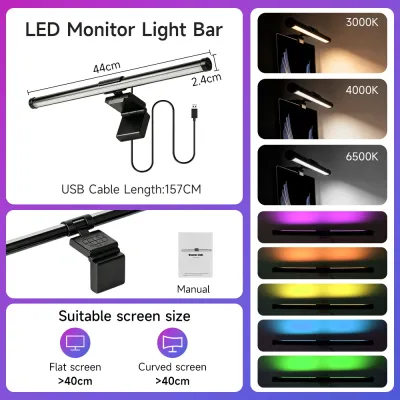
Color temperature refers to the warmth or coolness of the light emitted by a source, measured using the Kelvin (K) scale. Lower Kelvin values, typically ranging from 2700K to 3200K, produce a warm, yellowish light that mimics traditional incandescent bulbs, which is ideal for relaxation, casual browsing, or immersive gaming. Higher Kelvin values, such as 5000K to 6500K, produce a cool, bluish-white light similar to natural daylight, which is often preferred for high-focus tasks, detailed design work, and reading where crisp contrast helps maintain alertness.
Products mentioned in this guide
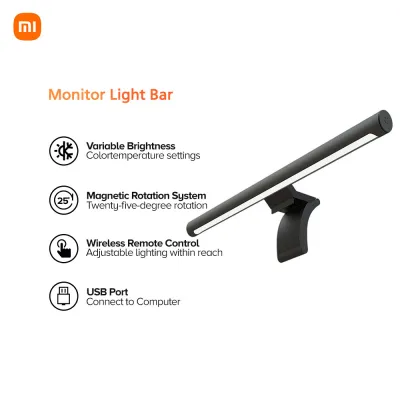
88 Lazada user ratings
Wish it not auto start when start the computer, otherwise the light bar is excellent.
Quality: 10/10 Appearance: 10/10 Performance: 10/10
The light is bright and evenly distributed,
Quality: Appearance: Performance:
Appearance:its noice
1,564 Lazada user ratings
Package arrived on time. It was well packed and is in good condition. Its box and the light bar feel premium. Easy to use using its round co…Read full reviewShow less
Package arrived on time. It was well packed and is in good condition. Its box and the light bar feel premium. Easy to use using its round controller. You can control the brightness and temperature. It does a great job in lighting up my desk when it’s dark and when you don’t to light up the whole room. Just wished that the cable is long enough for cable management to hide wires in sight.
I was so worried it'd be damaged upon delivery but it was pretty secured and well, though the actual box for the product had dents it had no…Read full reviewShow less
I was so worried it'd be damaged upon delivery but it was pretty secured and well, though the actual box for the product had dents it had no issue upon opening.
👜Portability:easy to install 💡Brightness:good levels of adjustment 🔋Energy Efficiency:i dont know about this lol but i do like the way they …Read full reviewShow less
👜Portability:easy to install 💡Brightness:good levels of adjustment 🔋Energy Efficiency:i dont know about this lol but i do like the way they packaged it, thanks
Enhances productivity, Adjustable brightness levels and angle, Great addition to my workspace, Heavy base that prevents falling of light bar…Read full reviewShow less
Enhances productivity, Adjustable brightness levels and angle, Great addition to my workspace, Heavy base that prevents falling of light bar, elegant design
Sleek and modern design, Great addition to my workspace, High-quality materials used, Enhances productivity,
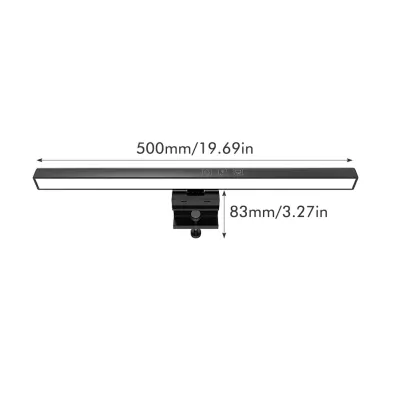
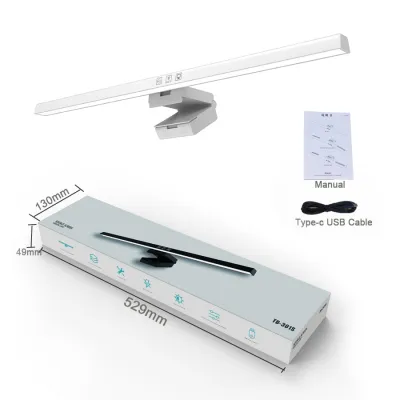
16 Lazada user ratings
I’ve been looking for and wanting this item for quite some time now. I hope it will protect my eyes from dryness and blurriness since my wor…Read full reviewShow less
I’ve been looking for and wanting this item for quite some time now. I hope it will protect my eyes from dryness and blurriness since my work always involves being in front of computers.
Love it! I hope you also have the 33cm in White. Worth every penny! Thanks seller 🫰🏼
🎨Design:100 💡Brightness:100 🛠️Durability:100 🛡️Safety:100
🎨Design:5/10 🛠️Durability:6/10 not satisfied
105 Lazada user ratings
At first, I was worried that the parcel would get broken. However, I got it safe and working as intended. I'm really impressed with how the …Read full reviewShow less
At first, I was worried that the parcel would get broken. However, I got it safe and working as intended. I'm really impressed with how the item was wrapped. The store really did a great job. Great Buy - Great Seller. Thanks!
🛠️Durability:Durable 🎨Design:Good but not advisable for very thin monitors 💡Brightness:Adjustable 🛡️Safety:The tape and magnet is sticky 🔋Ener…Read full reviewShow less
🛠️Durability:Durable 🎨Design:Good but not advisable for very thin monitors 💡Brightness:Adjustable 🛡️Safety:The tape and magnet is sticky 🔋Energy Efficiency:Plug and play
Solid build quality. Easy to install and setup. Touch controls are responsive and intuitive. Perfect for lighting my desk space. Thank you s…Read full reviewShow less
Solid build quality. Easy to install and setup. Touch controls are responsive and intuitive. Perfect for lighting my desk space. Thank you seller!
Easy to install and use, Great for gaming sessions, The RGB backlight adds a cool touch, Convenient USB power supply,
perfect for late night gaming
911 Lazada user ratings
Quality:Ayos at sturdy build. naman Appearance:made of metal at okndin yung clip nya. Performance:adjustable light with 3 light temperature …Read full reviewShow less
Quality:Ayos at sturdy build. naman Appearance:made of metal at okndin yung clip nya. Performance:adjustable light with 3 light temperature modes with dimmer din. Mabilis na ship at well packed. no damages. fully working. di masakit sa mata at fully adjustable. medyo umiinit yung adaptor nya kaya pag hindi gagamitin ay unplug nyo para makatipid sa kuryente. dapat xiaomi kc light kukunin ko kaso 1.5k isa eto mas mura 2 oa light at adjustable pa. sulit sana magtagal.
Works great! Tall enough to be placed behind my monitor though I had to use a different base so it can sit flat against the wall. I prefer u…Read full reviewShow less
Works great! Tall enough to be placed behind my monitor though I had to use a different base so it can sit flat against the wall. I prefer using it not so brightly but all lighting modes and intensities work! Hope this lasts.
Bright LED lights, Energy-saving LED technology, Sleek and modern design, Sturdy aluminum material, Easy to use touch switch,
bright enough but gets hot. usb powered. hope this will last. has 3 light modes and adjustable brightness
Prices are valid at publication and may change. Please refer to the product page for the latest price.

Many modern monitor light bars feature adjustable color temperature controls, allowing you to transition between warm and cool profiles throughout the day. When comparing products, it is important to verify the supported Kelvin range on the manufacturer’s product label or user manual. Look for models that offer a wide, continuous adjustment range rather than just two or three fixed presets, giving you finer control over your ambient environment.
What CRI (Color Rendering Index) Actually Means
The Color Rendering Index, or CRI, is a quantitative measure of a light source’s ability to reveal the colors of various objects faithfully in comparison with a natural light source. Measured on a scale from 0 to 100, a higher CRI value indicates that the light will make colors appear more accurate, vibrant, and true to life. A high CRI is particularly crucial if your work involves color-critical tasks, such as graphic design, photo editing, or physical crafting, as standard office lighting often has a lower CRI that can make colors look dull or slightly distorted.
When evaluating light bars, do not assume all LED fixtures offer excellent color rendering. You should actively check the manufacturer’s specifications for the explicit CRI rating, often designated as Ra. For general desk work, a CRI of 80 or above is typically sufficient, while color-sensitive professionals should look for a verified CRI of 90 or higher.
Lux and Brightness: Finding the Right Output
To understand a light bar’s brightness, you must distinguish between lumens and lux. Lumens measure the total amount of visible light emitted by a source in all directions, while lux measures luminous flux per unit area, indicating the actual intensity of light that hits a specific surface like your desk. The actual lux on your desk depends on several factors, including the mounting distance from the monitor to the desk surface and the beam angle of the light bar, as a light bar mounted on a tall monitor will distribute its light over a wider area.
When reviewing product specifications, look for the central illuminance value, which is usually expressed in lux at a standard distance (such as 40 or 45 centimeters). Many high-quality light bars feature adjustable brightness levels, allowing you to dim or brighten the output to match the ambient light in your room. Checking for these adjustable controls ensures you can maintain comfortable illumination levels without over-lighting your workspace.
Beam Angle and Asymmetric Light Design
One of the most critical features distinguishing a monitor light bar from a standard desk lamp is its beam angle and optical design. Traditional lamps cast light in a wide, symmetric cone, which often spills directly onto the monitor screen, causing distracting glare and reflections. An asymmetric light design uses internal reflectors or specialized lenses to project light forward and downward at a specific angle, ensuring the light path illuminates your keyboard and paperwork while keeping the monitor screen itself completely dark.
Before purchasing, verify the manufacturer’s optical design claims by looking at the product’s beam path diagrams. Additionally, examine the mounting mechanism in the specifications; the mount must hold the light bar at the correct angle relative to your screen to ensure the asymmetric beam functions as intended without slipping.
How to Compare Light Bars Using These Specs
To find the right light bar for your workspace, you can create a simple comparison checklist based on the technical specifications discussed. Start by listing the adjustable color temperature range, the verified CRI rating, the maximum lux output at desk level, and whether the unit features a true asymmetric optical design. Comparing these metrics side-by-side on online marketplaces will help you identify which model offers the best balance of performance for your budget.
Beyond optical specifications, you must verify physical compatibility and electrical requirements. Check the light bar’s mounting bracket dimensions against your monitor’s bezel thickness, and ensure it can accommodate curved screens or VESA mount arms if your setup uses them.
Finally, confirm the electrical specifications, including the required voltage (typically 5V USB power), the interface type (such as USB-C), and the maximum wattage limit. Ensuring your computer’s USB ports or an external power adapter can safely supply the required wattage is essential for stable, flicker-free operation.
Frequently Asked Questions (FAQ)
Does a higher CRI always mean a better gaming experience?
While a high CRI improves overall visual comfort and makes your physical desk accessories look more natural, the difference between very high CRI tiers (such as CRI 90 versus CRI 95) is generally negligible for pure gaming. For an immersive gaming setup, features like adjustable color temperature and effective glare reduction have a much more noticeable impact on eye comfort and visual focus.
How many lux do I need for a dual monitor setup?
A dual monitor setup typically requires a wider distribution of light to maintain even illumination across both workspaces. Instead of focusing solely on a high central lux value, look for a longer light bar or one with a wider beam spread to avoid dark spots on the outer edges of your desk. You should check the manufacturer’s recommended desk width coverage and lux distribution charts in the product manual to ensure adequate coverage.
Community discussion
Share your experience or ask a question. Comments are reviewed before publication.