
The desire to bring holiday cheer to the workplace is a common tradition, especially in the Philippines where the festive season spans several months. However, a standard office desk must remain primarily a functional workspace. Balancing seasonal spirit with daily productivity requires selecting decorations that offer high visual impact while occupying a minimal physical footprint.
Choosing the right desk Christmas decor involves evaluating how each item interacts with your daily tasks, office equipment, and shared environment. By focusing on vertical space, multi-functional accessories, and low-profile lighting, you can create a warm, festive atmosphere without cluttering your desk or creating safety hazards.
Key Criteria for Choosing Compact Desk Christmas Decor
The first step in planning your holiday desk setup is to measure your available surface area. Take note of the exact dimensions of unused zones, such as the space beneath your monitor, the corners behind your keyboard, or empty areas on raised desk shelves. Establishing these physical boundaries early prevents you from purchasing items that crowd your mouse pad or block your view of essential documents.
Products mentioned in this guide
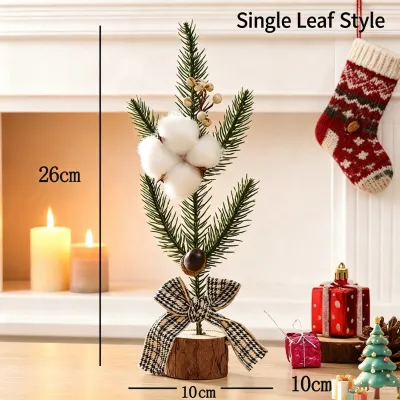
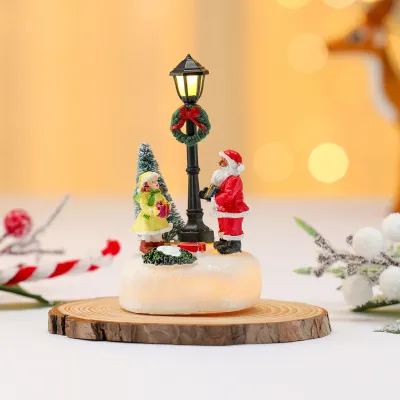
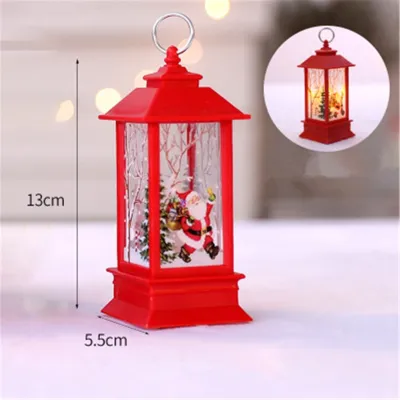
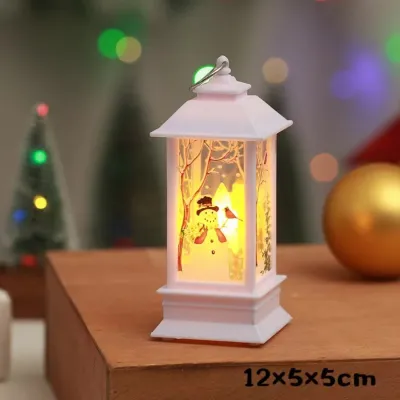

Prices are valid at publication and may change. Please refer to the product page for the latest price.
Vertical clearance is equally important, particularly if your desk features overhead cabinets, privacy partitions, or dual-monitor setups. A decoration that is too tall can obstruct your screens or interfere with overhead lighting, leading to awkward posture or increased eye strain. Aim for low-profile or vertically oriented decorations that utilize narrow, unused columns of space.
Power availability and cable management are critical factors when introducing electronic decorations. Office desks are already crowded with cords for computers, phones, and chargers, and adding more cables can quickly lead to a disorganized tangle. Before choosing lighted decor, locate your nearest power sources and determine if you have open USB ports or if you must rely on battery-operated options.
Visual comfort should guide your selection of colors, brightness levels, and movement. While flashing lights and animated figurines are festive, they can easily become major distractions in a professional setting, both for you and your nearby colleagues. Opt for steady, warm lighting and static decorations that provide a calming, cheerful backdrop rather than a chaotic visual environment.
Finally, always review your company’s specific policies regarding personal workspace decorations. Many organizations enforce strict guidelines concerning electrical safety, fire hazards, and shared space aesthetics to maintain a professional and safe environment. Consulting your facilities management team or checking the employee handbook beforehand ensures your holiday setup remains fully compliant.
Space-Efficient Christmas Decor Categories for Office Desks
Transforming your desk does not require a complete overhaul of your workspace; instead, a few carefully selected items can make a significant difference. By focusing on specific categories of space-saving decor, you can customize your setup to match your desk layout, power access, and personal style.

Combining different types of low-profile decorations allows you to build a cohesive holiday theme without overcrowding any single area. For instance, pairing a small vertical accent with a flat, functional accessory creates a balanced look that keeps your primary working zone completely clear and functional.
Miniature Trees and Small Potted Holiday Plants
Miniature trees are a classic holiday staple that can easily adapt to tight office spaces. When choosing between artificial options and live potted plants, consider the maintenance requirements and environmental conditions of your office. Artificial mini trees made of PVC, felt, or wood are highly durable, require zero watering, and can be packed away and reused year after year.
Live potted plants, such as small poinsettias, dwarf conifers, or potted rosemary, bring a fresh, natural element to your desk. However, in air-conditioned office environments common in the Philippines, these plants can dry out quickly or suffer from a lack of natural sunlight. They also require careful watering to prevent moisture from leaking onto sensitive electronic equipment or wooden desk surfaces.
Before purchasing a miniature tree, verify the base diameter to ensure it fits securely on your desk corner, monitor stand, or a small shelf. A tree with a wide, unstable base is easily knocked over by moving cables or reaching hands, which can disrupt your work or damage nearby items. Look for models with weighted bases or flat, sturdy stands that offer maximum stability.
Material safety is another crucial consideration for any greenery placed near office electronics. Ensure that any artificial trees or foliage are labeled as fire-retardant by the manufacturer, especially if they will be positioned near heat-generating devices like laptops, external hard drives, or desk lamps. Keeping a safe clearance between your decorations and electronic vents prevents overheating and reduces safety risks.
Micro Light Strings and Battery-Operated Accents
Micro light strings, often called fairy lights, are an excellent way to add a warm holiday glow to your desk without taking up valuable surface space. These lights feature tiny LED bulbs embedded along thin, flexible copper or silver wires that can be easily shaped and routed around existing office equipment.
When choosing between USB-powered and battery-operated micro lights, evaluate your desk’s power layout. USB-powered lights are highly convenient because they can plug directly into your computer, monitor, or a standard phone charger block, providing continuous illumination without the need for battery replacements. Battery-operated lights offer greater placement flexibility but require you to secure and conceal the battery box.
To maximize space, route your micro lights along the outer edges of your monitor bezel, underneath overhead shelves, or along the borders of your desk partition using small, removable adhesive clips. This keeps the cords completely off your active workspace. Another option is to coil a short string of battery-operated lights inside a clean glass jar or vase, creating a self-contained, glowing centerpiece with a very small footprint.
Pay close attention to the brightness and color temperature of your decorative lighting. Warm white LEDs (typically around 2700K to 3000K) provide a cozy, inviting feel that contrasts nicely with cool office lighting, but they should not be so bright that they cause screen glare or eye fatigue. Avoid rapid flashing, strobing, or intense color-changing modes to maintain a focused and professional work environment.
Functional Festive Accessories and Flat Decorations
Integrating festive elements into your everyday office tools is a highly effective way to decorate without adding any physical clutter. Replacing your standard desk accessories with holiday-themed versions allows you to maintain your usual workflow while enjoying the seasonal spirit.
Consider swapping your regular desk mat or mouse pad for one featuring a subtle holiday pattern or a warm, seasonal color palette. Similarly, using a festive ceramic mug for your daily coffee—or repurposing it as a temporary pen holder—adds a touch of holiday cheer to your desk while serving a practical, everyday purpose.
Flat decorations are another excellent option for utilizing vertical space that would otherwise go unused. Static-clings can be applied to glass desk dividers, windows, or smooth plastic partitions, while small, lightweight adhesive accents can be placed on the corners of your monitor frame. These items add visual interest without occupying any physical space on your desk surface.
When selecting functional accessories, prioritize durable, shatterproof materials and avoid fragile glass or delicate ceramic ornaments that could easily break if knocked over. Opt for items made of wood, heavy-duty plastic, felt, or metal, which can withstand the fast-paced movement of a busy workday without creating safety hazards or messy cleanups.
Workspace Safety and Setup Checks Before Decorating
Prioritizing safety during your holiday decorating ensures that your festive setup does not interfere with your work or create hazards for your colleagues. Start by organizing all decorative cables and routing them neatly behind your desk, keeping them far away from moving chair wheels, footwells, and active walkways where they could cause trips or falls.
Avoid overloading your desk’s power strips or wall outlets with multiple decorative items. Daisy-chaining extension cords or plugging too many non-work devices into a single power source can lead to electrical hazards and trip circuit breakers. Stick to low-voltage options, such as USB-powered lights, and ensure all plug-in decorations carry recognized electrical safety certifications.
Maintain clear ventilation space around all electronic equipment, including computer towers, laptops, monitors, and power adapters. These devices generate heat during daily use and require unobstructed airflow to function safely and efficiently. Keep artificial snow, fabric runners, paper decorations, and plastic greenery well away from cooling vents and power bricks to prevent overheating.
Use non-damaging, temporary attachment methods to secure your decorations to company-owned furniture and equipment. Reusable adhesive putty, silicone-based clips, and static-clings are excellent choices because they hold items securely without scratching surfaces, stripping paint, or leaving behind sticky residues. Avoid permanent tapes, hot glue, or metal tacks that can cause lasting damage to office property.
Finally, plan your post-holiday cleanup before you even set up your decorations. Choose items that are easy to disassemble, clean, and pack away into compact storage boxes. Keeping the original packaging for miniature trees and using labeled bags for light strings will make the transition back to your standard professional workspace quick, organized, and stress-free when the season ends.
Frequently Asked Questions (FAQ)
Can I use plug-in Christmas lights on my office desk?
Using plug-in Christmas lights on an office desk requires careful consideration of your workplace’s electrical capacity and safety guidelines. Shared office power strips are designed for low-wattage office equipment, and adding high-wattage or uncertified decorative lighting can pose an electrical hazard or trip circuit breakers. Never daisy-chain extension cords or plug multiple high-draw devices into a single outlet.
Before bringing in any plug-in decorations, verify the voltage and wattage limits of your desk outlets, and look for recognized electrical safety certifications on the product label. If your office has strict policies regarding personal appliances, opt for low-voltage USB-powered LED lights or battery-operated fairy lights instead. These alternatives draw minimal power and are generally permitted in most professional environments. Always consult your office facilities or safety team to ensure compliance with local workplace regulations.
How do I keep a mini Christmas tree from falling over?
Miniature Christmas trees are often lightweight and top-heavy, making them prone to tipping over when you reach for a phone or shuffle paperwork. To secure your tree without damaging company-owned furniture, apply a small amount of reusable adhesive putty or museum wax to the bottom of the base. This provides a firm grip on flat surfaces but can be peeled off easily without leaving a sticky residue or stripping the desk finish.
Another effective method is to lower the tree’s center of gravity by placing it inside a heavier container, such as a ceramic pot, a sturdy metal tin, or a heavy decorative tray. This adds stability and prevents the tree from sliding. Avoid using permanent adhesives, double-sided mounting tape, or hot glue, as these can permanently mar the desk surface and make removal difficult at the end of the season.
Community discussion
Share your experience or ask a question. Comments are reviewed before publication.