
Selecting the right desk lamp is one of the most impactful decisions you can make for your home office or study space in the Philippines. With many professionals and students working long hours into the evening, proper illumination is essential to maintain focus and prevent eye strain. Warm light, characterized by its soft, golden-amber glow, has become a popular choice for creating a comfortable and inviting workspace. However, finding the ideal lamp requires looking beyond aesthetic appeal to verify technical specifications, physical form factors, and electrical safety standards.
This guide will help you navigate the selection process, explaining how to evaluate color temperatures, brightness levels, physical designs, and safety certifications. By understanding what to look for, you can build a condition-based shortlist that fits your specific desk setup, budget, and daily tasks, ensuring a productive and visually comfortable environment.
Understanding Warm Light for Productivity and Eye Comfort
Color temperature is measured on the Kelvin (K) scale, and warm light typically falls within the range of 2700K to 3000K. This range mimics the soft, warm glow of traditional incandescent bulbs or the late afternoon sun. Unlike cool daylight, which contains high levels of blue light, warm light provides a gentler visual experience that is less stimulating to the eyes. This makes it highly suitable for evening work or study sessions, as it helps create a relaxing atmosphere that aligns with your body’s natural circadian rhythm.
Products mentioned in this guide
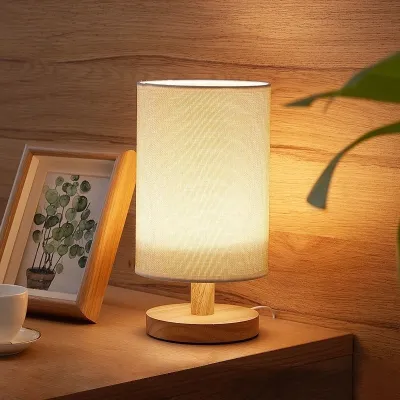
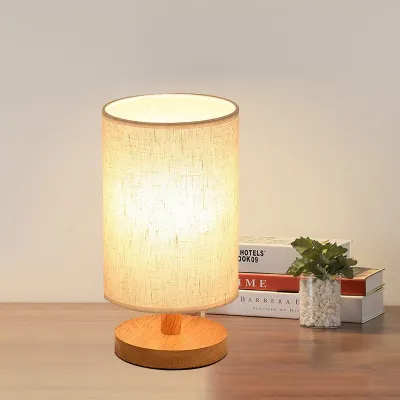
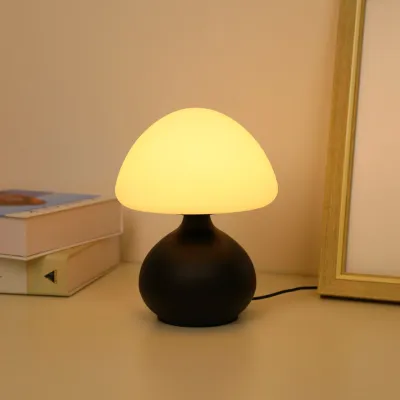
Prices are valid at publication and may change. Please refer to the product page for the latest price.
Using a warm desk lamp is particularly beneficial for reducing eye strain when balancing ambient room light with task-focused illumination. In many home offices, the contrast between a bright computer screen and a dark room can cause pupillary fatigue, as your eyes constantly adjust to the extreme difference in brightness. Placing a warm light source near your monitor or writing area softens this contrast, creating a more balanced visual field. This setup allows you to focus on physical documents or your keyboard without experiencing the harsh glare often associated with cool white overhead lighting.
While warm light is excellent for reading, writing, and general computer work, it is important to recognize its limitations. The yellow cast of warm light can alter your perception of colors, making it less suitable for tasks that require high color accuracy. If your daily work involves graphic design, photo editing, video production, or detailed crafts like sewing, you may find that neutral white light (around 4000K) or cool daylight (5000K to 6500K) is necessary. For a versatile workspace, consider looking for lamps that offer adjustable color temperatures, allowing you to switch to cool light for color-accurate tasks during the day and warm light for comfortable reading at night.
Essential Specifications to Verify Before Purchase
When evaluating potential desk lamps, brightness output is a critical specification to check. Rather than relying on wattage, which only measures power consumption, look for the lumen (lm) rating on the product packaging or specification sheet. A dedicated task lamp should ideally deliver between 300 and 500 lumens to the desk surface for comfortable reading and writing. Additionally, verify if the lamp features dimming capabilities. Stepless dimming, which allows you to smoothly adjust the brightness by holding down a button, offers the greatest flexibility for transitioning from afternoon natural light to complete darkness. Stepped dimming, which offers three or four preset brightness levels, is also acceptable but provides less precise control.

Another key specification is the Color Rendering Index (CRI), which measures how accurately a light source reveals the true colors of objects compared to natural sunlight. CRI is rated on a scale up to 100. For a study or home office lamp, look for a CRI rating of Ra 80 or higher. A higher CRI ensures that printed text is sharp and legible, and colors on physical documents or textbooks appear vibrant and true to life. Avoid lamps that do not list a CRI rating, as low-quality light sources can make text look muddy and contribute to visual fatigue over extended periods.
Physical adjustability is essential for directing light precisely where you need it while avoiding direct glare. Examine the lamp’s design for multi-axis joints, adjustable arm reach, and tilt angles. A highly adjustable lamp allows you to position the light source below eye level and angle it away from your computer screen, preventing distracting reflections. Furthermore, evaluate the stability of the base. If you choose a lamp with a long, adjustable arm, the base must be heavy enough to prevent the lamp from tipping over when the arm is fully extended. Check product dimensions and weight specifications to ensure the lamp can stand securely on your desk.
Finally, verify that the lamp operates without flickering. Many low-quality LED lamps utilize cheap drivers that cause the light to flicker at high frequencies. While this flicker may be invisible to the naked eye, it can still cause headaches, eye strain, and general fatigue during long study sessions. Look for manufacturer claims of “flicker-free” or “flickerless” operation. You can also perform a quick check by viewing the turned-on lamp through your smartphone’s camera screen; if you see moving dark bands or rapid strobing on the screen, the lamp is flickering and may not be suitable for long-term task lighting.
Choosing the Right Form Factor for Your Desk
The physical design of your desk lamp should match your workspace layout and usage habits. The three primary form factors are freestanding bases, clamp-on mounts, and monitor-mounted light bars. Freestanding lamps are the most traditional option, offering the advantage of portability. You can easily move a freestanding lamp around your desk or transfer it to another room. However, they require dedicated surface area, which can be a significant drawback if you have a compact desk or need space for multiple monitors, books, and writing materials.
Clamp-on lamps are an excellent space-saving alternative, securing directly to the edge of your desk to keep the entire surface clear. Before choosing a clamp-on model, measure your desk’s thickness and compare it to the clamp’s maximum opening limit specified by the manufacturer. Additionally, check for any backing boards, drawers, or cable trays underneath your desk that might block the clamp from securing properly. Ensure the clamp features protective rubber padding to prevent scratching or damaging your desk’s finish over time.
Monitor-mounted light bars represent a modern, highly efficient form factor that sits directly on top of your computer screen. These light bars project light downward in an asymmetrical path, illuminating your keyboard and desk space while completely avoiding the screen itself to eliminate glare. This design is ideal for very small desks, as it occupies zero desk surface. However, you must verify compatibility with your specific monitor. Check if the mounting clip can accommodate the thickness of your monitor’s bezel, and note that highly curved screens or ultra-thin displays may require specialized mounting brackets.
Cable management and power sources are also important practical considerations. Some lamps feature integrated USB cables that can be powered directly by your computer, a wall adapter, or even a portable power bank. USB-powered lamps offer great flexibility and can be highly useful in the Philippines during temporary power interruptions, as you can keep your workspace illuminated by plugging the lamp into a standard power bank. On the other hand, traditional AC-powered lamps typically offer higher maximum brightness levels and do not rely on your computer’s USB ports for power. Choose the option that best aligns with your desk’s proximity to wall outlets and your cable organization preferences.
Electrical Safety and Compatibility Checks
Before purchasing any electrical appliance, verifying safety and compatibility with local standards is paramount. In the Philippines, the standard electrical supply is 220V at 60Hz. Many imported desk lamps, especially those purchased online, may be designed for 110V systems standard in other regions. Operating a 110V-only lamp on a 220V outlet will cause immediate damage to the device and poses a serious fire and electrical hazard. Always check the product label, power adapter, or manufacturer specifications to ensure the input voltage is rated for 220V or is universally compatible (100V-240V).
Examine the plug type and power cord of the lamp to ensure a secure connection. The most common plug types in the Philippines are flat two-pin plugs (Type A) and round two-pin plugs (Type C). Ensure the lamp’s plug matches your wall outlets or extension cords without relying on loose, low-quality universal adapters, which can overheat and create safety risks. Additionally, check the length of the power cord to ensure it can comfortably reach your outlet without being stretched tight, which can damage the internal wiring over time.
Look for official safety certifications on the product packaging or the lamp itself. In the local market, look for the Philippine Standard (PS) mark or the Import Commodity Clearance (ICC) sticker, which indicates the product has undergone safety testing. For internationally branded lamps, look for recognized global safety certifications such as CE, FCC, or UL. These marks provide assurance that the lamp’s electrical components, insulation, and wiring meet rigorous safety standards, reducing the risk of short circuits or electrical fires.
If you opt for a lamp with a replaceable bulb rather than integrated LEDs, you must verify the bulb base compatibility, which is most commonly the E27 screw base. Always check the maximum wattage limit specified on the lamp fixture (for example, “Max 40W”). Installing a bulb that exceeds this limit can cause excessive heat buildup, melting the plastic components of the lamp and creating a fire hazard. For any complex installations, such as hardwired wall-mounted task lights or custom desk wiring, always isolate the power at your main circuit breaker and consult a qualified professional to ensure the work is completed safely and in compliance with local electrical codes.
Building Your Condition-Based Shortlist
To find the best warm light desk lamp for your specific needs, start by defining your must-have features versus optional upgrades. If your primary task is reading physical books or writing, a high CRI rating and physical adjustability should be your top priorities. If you primarily work on a computer, a space-saving monitor light bar with asymmetrical projection may be the ideal choice. Make a list of these essential requirements based on your daily routine and the physical limitations of your workspace.
Next, establish a realistic budget range in ₱. Basic, reliable warm light desk lamps can be found for under ₱1,000, offering standard on/off functionality and simple designs. Mid-range options, typically costing between ₱1,000 and ₱2,500, often feature adjustable brightness, multiple color temperature modes, and sturdier metal construction. Premium models, ranging from ₱2,500 to ₱5,000 or more, may include smart home integration, high-end optical designs to minimize glare, and built-in wireless charging pads. Setting a clear budget helps narrow down your options and prevents overspending on features you may not use.
When browsing online marketplaces or local retail stores, pay close attention to the seller’s warranty terms and return policies. A reputable brand or seller should offer a clear warranty period, ideally at least six months to a year, to protect against manufacturing defects. Be cautious of extremely cheap, unbranded lamps that offer no warranty, as they may fail quickly and lack essential safety features. Checking the return policy is also important in case the lamp arrives damaged or does not fit your desk as expected.
Finally, cross-reference the manufacturer’s specifications with actual user feedback. Read customer reviews on online marketplaces, focusing on long-term durability indicators. Look for comments regarding whether the adjustable joints remain stiff and secure over months of use, whether the base is heavy enough to prevent tipping, and if the power adapter gets excessively hot during extended operation. User photos and videos can also give you a more accurate representation of the light’s actual color temperature and brightness, helping you make a well-informed final decision.
Frequently Asked Questions (FAQ)
Can I use a warm light desk lamp for reading in bed?
Yes, a warm light desk lamp can be highly effective for bedside reading, provided you can adjust the angle to prevent direct glare into your eyes. Ensure the lamp’s base is stable on your nightstand, or use a secure clamp-on model attached to the headboard. Adjust the brightness to a lower level to maintain a relaxing environment that prepares you for sleep.
Does warm light consume more electricity than cool light?
No, the color temperature of a lamp does not affect its electricity consumption. Energy usage is determined entirely by the lamp’s wattage and the efficiency of its light source. An 8-watt warm LED lamp will consume the exact same amount of electricity as an 8-watt cool daylight LED lamp. Always check the actual power draw in watts on the product label to understand its energy efficiency.
How do I clean and maintain my desk lamp safely?
To clean your desk lamp safely, always unplug it from the wall outlet first and allow the bulb or LED panel to cool down completely. Wipe the exterior surfaces with a dry or slightly damp microfiber cloth to remove dust. Avoid using harsh chemical cleaners, abrasive pads, or excessive moisture, which can damage the protective finish, cloud the plastic diffusers, or penetrate the electrical housing and cause a short circuit.

Community discussion
Share your experience or ask a question. Comments are reviewed before publication.