
Selecting the right govee lamp involves matching the fixture’s form factor—such as a flexible clip-on, a monitor light bar, or an ambient RGBIC light—to your specific daily tasks. A well-designed desk setup requires a balance of focused functionality and visual comfort. Whether you are studying under late-night conditions, managing a complex dual-monitor professional workstation, or building an immersive gaming station, understanding how these devices interface with your desk and power supply is key to making a lasting investment.
In the Philippines, workspace lighting must also contend with local environmental factors. High relative humidity can affect adhesive mounts and rubber clamp pads over time, while frequent tropical weather events make energy-efficient USB-powered options highly practical during temporary power disruptions. By evaluating your primary desk activities and verifying physical compatibility, you can choose a lighting solution that protects your eyes and enhances your productivity.
Quick Guide: Matching Govee Lamp Categories to Desk Needs
To build an effective lighting setup, you must first identify your primary desk activities. Desk lighting generally falls into three functional categories: focused task illumination, screen glare reduction, and ambient or background lighting. Each category serves a distinct physiological purpose, and selecting the wrong style can lead to eye strain, headaches, or poor posture during long hours of work.
Products mentioned in this guide
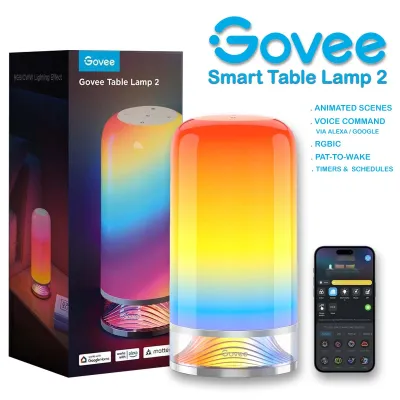
Prices are valid at publication and may change. Please refer to the product page for the latest price.
Focused task illumination is essential for activities that require high visual acuity on physical objects, such as reading books, writing notes, or doing detailed crafting. This setup requires a light source that can be positioned directly over your workspace without casting shadows from your head or hands. Flexible-neck clip-on lamps are the traditional choice here, as they allow you to direct a concentrated beam of light exactly where you need it.
Screen glare reduction is the primary goal for computer-heavy workflows. If you spend your day typing, programming, or analyzing spreadsheets, standard overhead lights or poorly positioned desk lamps can reflect off your monitor, causing intense glare that fatigues your eyes. USB-powered screen light bars solve this by mounting directly to the top of your monitor, casting light downward onto your keyboard and desk surface while keeping the screen itself in shadow.
Ambient and background lighting focuses on the overall visual environment of your room. When you work or game in a dark room with only a bright monitor shining at you, your eyes constantly adjust to the extreme contrast, leading to rapid fatigue. Ambient lighting, such as RGBIC clip lights or light bars placed behind your monitor, provides soft, indirect illumination that bridges the gap between your bright screen and the dark room, creating a much more comfortable viewing experience.
Best Govee Lamp Styles for Specific Workspace Scenarios
Different desk activities demand different optical designs, color rendering capabilities, and mounting mechanisms. Understanding how these styles perform in real-world scenarios will help you narrow down your choices.

Focused Task Lighting for Reading and Detailed Work
For desks dedicated to studying, paperwork, or manual crafts, a flexible-neck clip-on lamp is highly effective. These lamps feature an adjustable neck that can be bent and twisted to eliminate shadows. When selecting a clip-on model, look for options that offer adjustable color temperatures, typically ranging from warm white to cool white. Warm white light is highly comfortable for casual reading and wind-down periods, whereas cool white light increases alertness and contrast, making it ideal for detailed editing or handwriting.
Before purchasing, you must measure the thickness of your desk edge. Most clip-on lamps specify a maximum clamp opening width; if your desk has a thick wooden top, a beveled edge, or an under-frame steel support beam, a standard clamp may not sit securely. A loose clamp poses a safety hazard, as the lamp could fall and sustain damage or injure the user.
For detailed tasks like drawing, painting, or color-matching, pay close attention to the Color Rendering Index (CRI) of the light source. A high CRI (typically 90 or above) ensures that colors appear vibrant and true to life under artificial light. Always verify this specification on the product packaging or official manufacturer listing, as low-CRI lights can make colors look dull, gray, or distorted, leading to mistakes in creative work.
Monitor Setups and Screen Light Bars
If your workspace is dominated by one or more computer screens, a USB-powered screen light bar is an excellent space-saving solution. These lamps use an asymmetric optical design that directs light at a precise angle downward, illuminating the desk space in front of your keyboard without spilling light onto the monitor glass. This design eliminates screen glare entirely, allowing you to work comfortably in low-light environments.
Compatibility is a critical step when choosing a screen light bar. You must check your monitor’s physical dimensions, specifically the thickness of the top bezel and the design of the monitor’s back panel. Many screen light bars use a gravity counterweight or a spring-loaded clip to stay in place. If your monitor has an extremely thin bezel, the front lip of the mount might block a tiny portion of your screen or camera. Additionally, ensure your computer or a nearby power strip has an accessible USB-A or USB-C port capable of delivering steady power to the light bar.
Some advanced models in the smart lighting ecosystem feature auto-dimming capabilities or integrated ambient light sensors. These sensors detect the brightness of your room and automatically adjust the light bar’s output to maintain a consistent, eye-safe level of illumination. If you plan to use these automated features, verify the sensor’s placement on the light bar to ensure it will not be blocked by shelving or other desk accessories, and check the companion app’s system requirements for your mobile device.
Ambient and RGB Lighting for Gaming or Creative Desks
For gaming setups, streaming stations, or creative studios, the focus shifts from strict task lighting to atmospheric design. RGBIC clip-on lights and smart accent bars are designed to introduce dynamic, multi-color lighting patterns to your workspace. Unlike standard RGB lights that can only display a single color at a time across the entire fixture, RGBIC technology features independent control chips, allowing a single lamp to display multiple colors simultaneously in smooth gradients.
These smart lamps integrate deeply with companion mobile applications, enabling features like customizable scene modes, scheduling, and music synchronization. Music sync utilizes an integrated microphone or your phone’s audio input to translate game sounds, music, or your voice into real-time lighting pulses. This creates an incredibly immersive environment for content creators and gamers alike.
However, it is crucial to understand that ambient RGBIC lights are designed for decorative and atmospheric purposes. They do not provide the focused, high-CRI white light required for reading, writing, or detailed physical tasks. If your desk serves a dual purpose—such as daytime remote work and nighttime gaming—you should combine an ambient RGBIC light with a dedicated white task light or screen light bar rather than relying on colored light for visual tasks.
Essential Specifications to Verify Before Purchasing
To ensure your new lamp operates safely and fits seamlessly into your workspace, you must verify several physical and electrical specifications before making a purchase.
- Power Source and Voltage: USB-powered lamps typically run on a 5V direct current (DC) supply, drawing power from a computer port, a monitor, or a standard USB wall adapter. This low-voltage design is highly safe and versatile. However, if you choose a larger, plug-in desk lamp that requires an AC outlet, you must verify that the included power adapter supports the standard voltage in the Philippines, which is 220V at 60Hz. Using an incompatible 110V adapter will permanently damage the electronics and presents a fire hazard. Always check the plug shape; local outlets typically accept Type A (flat two-pin) or Type B (three-pin) plugs.
- Clamp Dimensions and Desk Edge: Measure your desk's edge thickness with a ruler before buying a clip-on model. Look for any obstructions underneath the desk surface, such as structural metal bars, cable management trays, or decorative trim. In the humid tropical climate of the Philippines, rubber or foam pads on cheap clamps can degrade, become sticky, or lose traction over time. Ensure the clamp mechanism uses high-quality, non-slip silicone pads and a robust metal screw thread to maintain a tight grip.
- Smart Home and App Integration: Govee smart lamps rely on Wi-Fi or Bluetooth to connect to your smartphone or smart home ecosystem. Most smart features, voice commands, and remote scheduling require a stable 2.4GHz Wi-Fi network. If your home uses a modern dual-band router, you must ensure you can broadcast a dedicated 2.4GHz network, as these smart devices generally do not support 5GHz bands. Check that the companion app is compatible with your mobile operating system version.
- Brightness and Adjustability: Rather than relying on generic marketing claims, look for lamps that offer stepless dimming (allowing you to adjust brightness smoothly from 1% to 100%) and a wide color temperature range, such as 2700K (warm, yellowish light) to 6500K (cool, daylight-balanced light). This level of adjustability allows you to customize the light to match the changing natural light in your room throughout the day.
Installation, Safety, and Desk Compatibility Tips
Proper installation and regular maintenance will protect your desk surfaces, prolong the lifespan of your lamp, and ensure a safe working environment.
- Surface Protection: Clamping a heavy metal lamp directly onto a wooden, veneered, or laminate desk can leave permanent indentations or scratches. This is especially true for engineered wood like MDF, which can soften or swell in high-humidity environments. To prevent damage, place a thin piece of felt, a silicone sheet, or a soft cloth between the clamp pads and your desk surfaces before tightening the mechanism.
- USB Power Limits: Avoid plugging your USB lamp into an unpowered USB hub along with other high-draw devices like external hard drives or webcams. Standard USB 2.0 ports on computers output only 0.5 amperes (A), which may not provide enough power for a smart lamp, causing it to flicker, disconnect from Wi-Fi, or fail to reach maximum brightness. Connect the lamp directly to a USB 3.0 port (which outputs 0.9A), a dedicated USB-C port, or a high-quality 5V/2A wall adapter.
- Cable Management: Loose, dangling cables are a safety hazard; they can easily catch on your office chair, your knees, or pets, pulling the lamp off your desk. Route the power cable neatly along the underside of your desk or down the monitor stand. Use adhesive cable clips or hook-and-loop straps to secure the wire. Note that high humidity can weaken cheap adhesive backings, so clean the desk surface thoroughly with isopropyl alcohol before applying any adhesive clips, or opt for mechanical cable ties.
- Weight and Balance: If you are using a clip-on lamp with a long, articulated arm, the center of gravity will shift significantly as you extend or bend the arm. Always ensure the clamp base is fully seated against the desk edge before adjusting the neck. Test the stability of the lamp at its maximum extension; if the clamp lifts or creaks, adjust the arm to keep the weight centered closer to the desk edge to prevent tipping.
Frequently Asked Questions (FAQ)
Can I use a Govee USB lamp with a power bank?
Yes, you can use a Govee USB lamp with a portable power bank, provided the power bank outputs the standard 5V required by the lamp. This is an incredibly useful backup option during power outages or typhoons in the Philippines, allowing you to maintain emergency lighting at your desk. However, using a power bank is not recommended for daily, long-term use. Constant charging and discharging cycles will degrade your power bank’s battery health, and minor power fluctuations from some power banks can cause smart lamps to temporarily lose their Wi-Fi connection.
Do Govee smart lamps work without Wi-Fi?
Yes, Govee smart lamps will still function without a Wi-Fi connection. You can use the physical buttons on the lamp’s body or the inline controller on the power cord to turn the light on and off, adjust brightness levels, and cycle through basic color temperatures or preset colors. Many models also support direct Bluetooth control, allowing you to use the companion app on your phone within a short range. However, you will lose access to remote smart features, automated schedules, voice control via smart assistants, and over-the-air firmware updates until the lamp is reconnected to a stable 2.4GHz Wi-Fi network.
Will a clip-on lamp damage a glass desk?
Using a clip-on lamp on a glass desk requires extreme caution. Glass is highly sensitive to concentrated pressure points, and overtightening a metal clamp can cause the glass to shatter instantly. If you must use a clip-on lamp on a glass surface, first verify that the desk manufacturer explicitly supports clamped accessories. Always use thick, soft rubber or silicone padding to distribute the clamping force evenly, and tighten the clamp only to the point where the lamp is stable—never overtighten it. If your glass desk is thin or unrated for accessories, it is highly recommended to avoid clip-on lamps entirely and opt for a freestanding desk lamp or a monitor light bar with a gravity-based mount instead.
Community discussion
Share your experience or ask a question. Comments are reviewed before publication.