
Finding the right task lighting is a crucial step in building an efficient work-from-home or study environment. When selecting a clip-on or USB lamp, the goal is to balance physical convenience with optical quality. Because these compact lamps are designed for localized illumination, they must fit securely onto your existing furniture while providing the exact light intensity and color temperature your daily activities require. Whether you are prepping for board exams, drafting design plans, or reading in a shared bedroom, understanding how these compact fixtures operate ensures you make a smart, lasting investment.
Identifying Your Core Lighting Needs by Setup
To choose the right lamp, start by assessing your physical workspace and the specific visual tasks you perform daily. General overhead lighting in many homes—especially in tropical households where high-ceiling fans or central fixtures are common—often casts distracting shadows over your desk. A dedicated clip-on or USB lamp delivers targeted task lighting directly where it is needed, reducing the strain on your eyes.
Begin by analyzing the thickness and material of your mounting surfaces. A heavy, solid wood dining table repurposed as a home office desk requires a clamp with a wide maximum jaw opening. Conversely, a modern, thin metal-framed desk or a particle-board shelf demands a clamp with high-friction, non-slip padding to prevent slipping under the weight of the lamp head.
Products mentioned in this guide
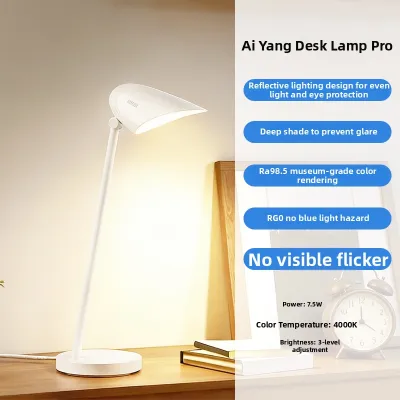
Prices are valid at publication and may change. Please refer to the product page for the latest price.
Next, consider your proximity to power sources. If your desk sits far from a wall outlet, a USB-powered lamp offers the flexibility to run directly from a laptop port, a desktop tower, or a portable power bank. This is particularly advantageous in regions prone to sudden power fluctuations or rotating brownouts, where a power-bank-compatible light ensures your work or study session continues uninterrupted.
Finally, evaluate how much physical adjustability your tasks demand. A flexible, silicone-coated gooseneck allows you to bend and twist the light source to eliminate glare on your computer screen or to focus intensely on a physical textbook. If you frequently transition between typing on a keyboard and sketching on paper, a highly adjustable neck is essential. If your setup is static, a lamp with fixed pivot joints might offer a more streamlined aesthetic while providing stable, reliable positioning.
Matching Lamp Features to Your Primary Scenario
Choosing the right lamp features involves matching the technical specifications of the light source to your primary activities. Rather than relying on generic marketing claims, focus on observable metrics such as color temperature, brightness adjustments, and structural dimensions.

Focused Studying and Detailed Desk Work
For high-concentration tasks like studying, coding, or detailed paperwork, the quality of light directly impacts your cognitive stamina and eye comfort. Look for lamps that offer adjustable color temperatures, specifically featuring a cool white setting between 5000K and 6500K. Cool white light mimics daylight, which helps maintain alertness and enhances visual contrast, making small text much easier to read.
Equally important is verifying that the lamp operates without visible or invisible flickering. High-frequency flicker, common in lower-end LEDs, can cause rapid eye fatigue, headaches, and general discomfort during extended study sessions. Check product specifications for flicker-free driver technology. Additionally, prioritize a high Color Rendering Index (CRI) of 80 or above. A high CRI ensures that colors are represented accurately, which is vital if you are reviewing colored diagrams, architectural drawings, or editing photos.
The physical shape of the light panel also plays a major role in your comfort. A wider light panel or a T-shaped head distributes light more evenly across your desk, preventing the harsh contrast between a bright hotspot and dark corners. This even distribution helps your eyes transition smoothly when looking from a textbook to a notebook or laptop screen.
Bedside Reading and Relaxation
When a lamp is intended primarily for bedside reading or winding down before sleep, the optical and physical requirements shift dramatically. In this scenario, high-intensity cool white light is counterproductive, as blue-spectrum light suppresses melatonin production and disrupts your natural sleep cycle. Instead, look for a lamp that offers a warm light setting, ideally around 2700K to 3000K, which mimics the relaxing glow of a traditional incandescent bulb.
The lamp must also feature multiple lower brightness tiers. A low-lumen setting allows you to read comfortably in the dark without straining your eyes or disturbing a sleeping partner. This makes precise dimming controls highly desirable for bedroom environments.
From a physical standpoint, measure your headboard or bedside table before purchasing. Bedside furniture often features unique shapes, such as thin metal frames or thick upholstered panels. Ensure the clamp’s maximum opening width and jaw depth can securely grip your specific headboard without slipping. A compact, lightweight design is also essential; a heavy, bulky lamp can look visually intrusive in a calm bedroom setting and may place unnecessary stress on delicate furniture joints.
Cross-Scenario Compatibility and Portability
If you need a single lamp that can transition between a daytime desk setup and a nighttime reading spot, portability and power flexibility become your primary criteria. Dual-purpose lamps generally fall into two categories: battery-powered models and direct plug-in USB models.
Battery-powered USB lamps offer unmatched mobility, allowing you to carry the light to a dining table, a balcony, or an outdoor patio without worrying about cord length. However, the trade-off is operating time and brightness consistency. As the battery drains, the light output often dims. If you select a battery-powered model, verify the battery capacity (measured in milliampere-hours or mAh) and check whether the manufacturer supports pass-through charging, which allows the lamp to operate normally while plugged in.
Direct plug-in USB lamps, on the other hand, provide consistent, maximum brightness because they draw continuous power from an external source. They are generally lighter because they lack a heavy internal battery, but they restrict your movement to the length of the USB cable. When evaluating these models, check the charging interface. USB-C ports are generally more durable and easier to plug in than older Micro-USB ports, which can wear down over time with frequent plugging and unplugging.
Essential Specifications and Safety Checks Before Buying
Before finalizing your purchase, performing a few technical and safety checks will ensure the lamp integrates safely into your electrical and physical setup.
Power and Compatibility: First, verify the lamp’s specific voltage and amperage requirements, which are typically printed on the product label or user manual. Most USB task lamps operate on a standard 5V DC input, but the required amperage can vary between 1A and 2A. If you plug a 5V/2A lamp into an older laptop USB port rated for only 5V/0.5A or 1A, the lamp may flicker, fail to reach full brightness, or shut down entirely. Ensure your wall adapter, power bank, or USB hub is rated to deliver the necessary output.
Mounting and Stability: Inspect the construction of the clamp. A high-quality clip-on lamp should feature robust spring tension or a secure screw-clamp mechanism, complemented by thick silicone or foam padding on the inner jaws. This padding provides the friction needed to keep the lamp stable while protecting your furniture from scratches or pressure marks. If you are considering a convertible model that transitions from a clip to a free-standing base, verify the weight of the base. A base that is too light will easily tip over when the gooseneck is fully extended.
Electrical Safety: Electrical safety is paramount for any plug-in device. Look for recognized safety certifications on the product packaging, such as CE, FCC, or local regulatory marks. To maintain a safe electrical environment, avoid daisy-chaining multiple high-draw USB devices on a single unpowered USB hub, as this can lead to overheating and voltage drops. Always inspect the USB cable for physical wear, especially near the joints where the cable meets the plug and the lamp body.
Heat Dissipation: Even energy-efficient LED lamps generate heat, particularly high-brightness models that pack many diodes into a small head. Sansi utilizes advanced ceramic heat dissipation technology in many of its designs, which allows heat to dissipate directly through the ceramic body without relying on heavy aluminum heat sinks. However, some heat will still be noticeable at the lamp head or joint during prolonged use. Always ensure there is adequate ventilation space around the lamp head, and never cover it with clothing, paper, or other flammable materials.
Practical Setup and Maintenance Tips for Clip-On Lamps
Proper installation and regular maintenance will extend the lifespan of your lamp and ensure a comfortable, glare-free visual environment.
Positioning: To minimize eye strain, position the lamp head so that the light source is not directly in your line of sight. The light should be angled downward onto your workspace. If you work on a computer, position the lamp to the side and slightly behind the plane of the screen to prevent light from reflecting off the glass and causing distracting screen glare. For writing or sketching, place the lamp on the side opposite your dominant hand to prevent your hand from casting shadows across your paper.
Cable Management: Loose, hanging USB cables pose a tripping hazard and can easily snag, pulling your lamp off its mount and potentially damaging the fixture or your furniture. Route the USB cable neatly along the back of your desk legs or bed frame. You can secure the cable using simple adhesive cable clips, hook-and-loop ties, or reusable silicone straps. Ensure there is a small amount of slack near the lamp head so you can adjust the gooseneck freely without tensioning the cable.
Cleaning and Care: In humid environments, dust and airborne particles can quickly accumulate on the lamp’s surface and the LED cover, reducing light output over time. Before cleaning, always turn off the lamp and unplug the USB cable from its power source. Use a dry or slightly damp microfiber cloth to gently wipe away dust from the lamp head, gooseneck, and clamp. Never spray cleaning liquids directly onto the lamp. Avoid using harsh chemical solvents, alcohol, or abrasive pads, as these can degrade plastic housings, strip protective coatings, and dry out silicone non-slip pads, causing them to lose their grip.
Frequently Asked Questions (FAQ)
Can I use a power bank to run my USB desk lamp all night?
Yes, you can run a USB desk lamp using a power bank, which is an excellent backup during power outages. To estimate how long it will run, compare the power bank’s capacity with the lamp’s power consumption. For example, a typical 5-watt USB lamp running on a 10,000mAh (37-watt-hour) power bank will theoretically operate for about 7.4 hours. In practice, actual run time will be slightly shorter—usually around 5 to 6 hours—due to energy lost as heat during the power bank’s voltage conversion and the efficiency limits of the battery cells. Lowering the lamp’s brightness setting will significantly extend this run time.
Will the clip damage my wooden desk or leather headboard?
A well-designed clip-on lamp with built-in silicone or dense foam padding should not damage sturdy furniture. However, if the clamp is applied with excessive force to delicate, highly polished, or antique wooden surfaces, or soft materials like genuine leather, it can leave compression marks or scuffs. To prevent this, inspect the clamp’s padding before mounting. For extra protection on sensitive surfaces, check the treated item’s manufacturer instructions, and place a thin protective barrier—such as a small piece of felt, a silicone coaster, or a thick piece of cardboard—between the clamp jaws and your furniture.
Community discussion
Share your experience or ask a question. Comments are reviewed before publication.