
Working from home or studying in the Philippines presents unique spatial and environmental challenges. Many setups are carved out of shared dining areas, compact bedrooms, or dedicated home offices where ambient lighting is often insufficient or poorly positioned. A dedicated work lamp is not merely an accessory; it is a critical tool for maintaining focus, preventing eye strain, and creating a productive micro-environment. Rather than relying on generic recommendations, selecting the right task lighting requires a systematic evaluation of optical performance, physical form factors, ergonomic placement, and local electrical compatibility.
By establishing a clear framework for your lighting needs, you can avoid the common pitfalls of purchasing underpowered or poorly designed fixtures. This guide outlines the essential technical specifications to look for, how to match a lamp’s design to your desk layout, and how to verify safety standards before making a purchase.
Key Optical Features to Evaluate Before Buying
To evaluate a work lamp’s performance, you must look beyond aesthetic design and focus on core optical metrics. The first of these is illuminance, which refers to the amount of light that actually reaches your desk surface. While manufacturers often list luminous flux in lumens, the actual light level on your desk is measured in lux. For comfortable reading and writing, a target of 300 to 500 lux on the work surface is generally recommended. Because ambient light levels in tropical regions fluctuate dramatically between bright, sunny mornings and dark, rainy afternoons, a work lamp must feature adjustable brightness levels. Step-less dimming or multiple preset brightness steps allow you to adapt the light output to match these changing external conditions.
Products mentioned in this guide
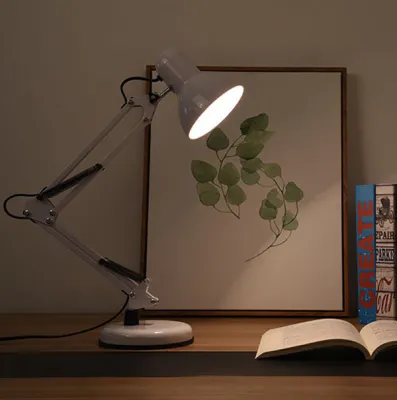
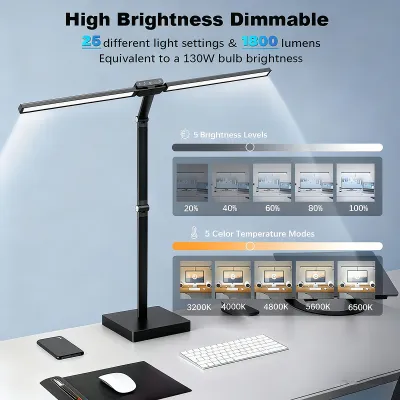
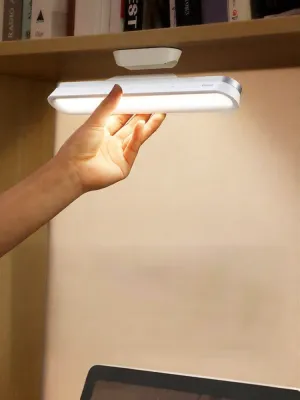
Prices are valid at publication and may change. Please refer to the product page for the latest price.
Color temperature, measured in Kelvin (K), is another critical factor that directly influences your cognitive state and comfort. Cool white light, typically ranging from 5000K to 6500K, mimics natural daylight and is highly effective for stimulating alertness, focus, and productivity during intense study or work sessions. Conversely, warm white light, ranging from 2700K to 3000K, creates a cozy, relaxing atmosphere that is ideal for evening reading or winding down before sleep. Neutral white light, around 4000K, offers a balanced, natural appearance suitable for general tasks. Selecting a work lamp with adjustable color temperature allows you to transition your workspace seamlessly from a high-focus daytime office to a calm evening study area.
The Color Rendering Index (CRI) measures how accurately a light source reveals the true colors of objects compared to natural light. Rated on a scale up to 100, a higher CRI indicates better color accuracy. For general typing and reading, a CRI of 80 or above is perfectly adequate. However, if your work involves color-critical tasks such as graphic design, photo editing, architectural drafting, or crafting, you should look for a lamp with a CRI label of Ra 90 or higher. This ensures that the colors you see on physical documents, prints, or materials are accurate and vibrant, reducing the risk of costly color errors.
Finally, physical adjustability and reach determine how effectively a lamp can deliver light to your specific work zone. A rigid, non-adjustable lamp often forces you into awkward seating postures or casts unwanted glare on your screen. Look for lamps with multi-axis joints, flexible goosenecks, or counterbalanced swing arms. These features allow you to adjust the height, tilt, and angle of the lamp head, ensuring the light is directed precisely where you need it, regardless of your desk depth or monitor height.
Matching Lamp Form Factors to Your Desk Configuration
The physical design of your work lamp should align with your available desk space, monitor setup, and daily habits. Traditional base desk lamps remain a popular choice due to their stability and ease of placement. These lamps feature a heavy, weighted base that sits directly on the desk surface. While they are highly stable and easy to move around, they occupy a permanent footprint on your desk. This can be a significant drawback if you work on a compact desk where space is already limited by a keyboard, mouse, notebooks, and other work essentials.

For shallow desks or highly congested workspaces, clip-on lamps and monitor light bars offer excellent space-saving alternatives. Clip-on lamps use a heavy-duty clamp to attach to the edge of your desk, freeing up valuable surface area. Monitor light bars, also known as screen bars, take this space-saving concept a step further by mounting directly onto the top bezel of your computer monitor. They project light downward in a precise, asymmetrical beam that illuminates the desk space directly in front of you without casting light onto the screen itself. This design is highly suitable for digital-centric workflows, shallow desks, or dual-monitor configurations where traditional lamps would cause screen glare or take up too much space.
Architect and swing-arm lamps are the preferred choice for expansive workspaces, drafting tables, or L-shaped desks. These lamps utilize a spring-balanced arm clamped to the desk edge, providing exceptional reach and the ability to position the light source high above the work surface. This allows you to illuminate large physical documents, blueprints, or crafting projects with ease. However, swing-arm lamps require sufficient clearance space around the desk to allow the arm to bend and rotate without hitting walls, shelves, or overhead cabinets.
Rechargeable and cordless lamps offer unmatched portability, making them highly suitable for flexible WFH setups where you might transition from a dedicated desk to the dining table or a balcony. Powered by internal lithium-ion batteries, these lamps eliminate cable clutter and can operate during power outages. However, they come with notable trade-offs, including limited battery runtimes at maximum brightness, the eventual degradation of battery capacity over time—especially in warm, humid climates—and the need for regular recharging. They are best utilized as secondary, mobile light sources rather than your primary, heavy-duty work lamp.
Setting Up for Visual Comfort and Eye Strain Prevention
Properly arranging your work lamp is just as important as selecting the right hardware. The primary goal of task lighting setup is to minimize visual fatigue, which is often caused by glare, harsh contrast, and improper positioning. Glare can be categorized into direct glare, which occurs when the light source shines directly into your eyes, and reflected glare, which happens when light bounces off your monitor screen or glossy paper. To prevent direct glare, ensure the lamp head is positioned below eye level or tilted slightly away from your direct line of sight. To eliminate screen reflections, position the lamp so that its light path does not intersect with the viewing angle of your monitor, or use an asymmetrical monitor light bar designed specifically to prevent screen glare.
Lighting contrast is another common contributor to eye strain. Working in a dark room with only a bright, concentrated beam of light on your desk forces your eyes to constantly adjust between the bright work area and the dark surroundings. This continuous pupillary adjustment leads to rapid eye fatigue and headaches. To maintain a comfortable visual environment, always balance your task lighting with soft ambient room lighting. This can be achieved by keeping a ceiling light on, using a floor lamp to bounce light off the walls, or utilizing a soft backlight behind your monitor.
Flicker and blue light exposure are subtle factors that can impact your long-term comfort and well-being. High-frequency flickering, though often invisible to the naked eye, can cause eye strain, fatigue, and headaches over several hours of exposure. When shopping for a work lamp, check the product specifications or packaging for “flicker-free” technology or certifications from recognized testing bodies. Additionally, excessive exposure to blue light in the evening can disrupt your circadian rhythm and interfere with sleep. Utilizing a lamp with adjustable color temperature allows you to switch to a warm, low-blue-light setting as evening approaches, helping your body prepare for rest.
The physical placement of the lamp relative to your body also plays a crucial role in preventing distracting shadows. If you are right-handed, place the lamp on the left side of your desk; if you are left-handed, place it on the right. This simple adjustment ensures that your hand and arm do not cast shadows over your writing, reading, or typing area. Additionally, position the light source high enough to provide broad coverage across your active work zone while keeping the bulb or LED array shielded from direct view.
Power, Smart Features, and Desk Space Trade-offs
Modern work lamps offer a variety of power delivery methods and supplementary features that can either streamline your workspace or add unnecessary complexity. Traditional lamps plug directly into standard wall outlets, providing a reliable and consistent power supply. Many contemporary lamps, however, utilize USB or Type-C power inputs. This allows you to power the lamp directly from your computer, a monitor hub, or a portable power bank, significantly reducing cable clutter. However, you must verify the wattage requirements of the lamp. A standard USB port on an older laptop may not deliver sufficient power, resulting in dim light or unstable performance. Always ensure you use a compatible USB wall adapter that meets the manufacturer’s specified voltage and amperage.
Smart features, such as smartphone app integration, voice assistant compatibility, and automatic dimming sensors, offer enhanced convenience but often come at a premium price. Auto-dimming sensors are particularly useful, as they detect ambient light levels and automatically adjust the lamp’s output to maintain a consistent level of brightness on your desk. Voice and app controls allow you to adjust settings without reaching for the lamp, which can be helpful if the lamp is mounted in a hard-to-reach position. Evaluate whether these smart features align with your daily workflow or if simple, intuitive physical buttons or touch sliders are more practical and cost-effective for your needs.
Desk organization and cable management are essential for maintaining a clutter-free, productive environment. When choosing a lamp, consider the size and shape of its base. A compact, weighted base or a clamp-on design helps maximize your usable desk space. Additionally, look for lamps that feature built-in cable routing channels or clips along the arm. This allows you to secure the power cord neatly, preventing it from tangling with other cables or cluttering your desk surface.
Some work lamps incorporate added utilities into their bases, such as integrated wireless charging pads or USB expansion hubs. While these features can be highly convenient for charging your smartphone, wireless earbuds, or other small devices directly on your desk, they require careful evaluation. Verify the charging speed of the wireless pad, as some integrated chargers operate at very low wattages, resulting in slow charging times. Ensure that these added utilities do not compromise the primary optical performance of the lamp and that the extra cost is justified compared to using dedicated, standalone charging accessories.
Building Your Shortlist: Pre-Purchase Checks and Safety Verification
Before finalizing your purchase, it is crucial to perform a series of pre-purchase checks to ensure the work lamp is safe, compatible, and cost-effective in the long run. In the Philippines, the standard electrical supply is 220V-240V at 60Hz. If you are purchasing an imported lamp or one from an international online marketplace, verify that the voltage rating matches this standard. Using a lamp designed solely for 110V systems without a proper step-down transformer can result in immediate product failure, electrical shorts, or fire hazards. Additionally, check the plug type; most local outlets accommodate Type A (two flat parallel pins) or Type B (two flat pins with a round grounding pin) plugs. Ensure the lamp’s plug is compatible to avoid relying on loose, unsafe adapters.
Electrical safety should always be a primary consideration. Look for recognized safety certification marks on the product packaging or manufacturer specifications. In the local market, look for the Philippine Standard (PS) mark or the Import Commodity Clearance (ICC) sticker, which indicate that the product has undergone rigorous safety testing. For internationally sourced lamps, look for reputable certifications such as CE, FCC, or RoHS. Additionally, review the manufacturer’s warranty terms. A reliable warranty, typically spanning one to two years, protects your investment against premature component failures, particularly in the LED driver or touch control circuitry.
When purchasing through e-commerce platforms, pay close attention to the seller’s return policies and customer feedback. Ensure that the platform offers a straightforward return window in case the lamp arrives damaged, has defective LEDs, or does not match the advertised specifications. Because lighting fixtures often contain fragile components like glass, plastic diffusers, or delicate joints, verify that the seller packages the item securely with sufficient protective materials. Reading customer reviews can provide valuable insights into the seller’s packaging quality and the real-world reliability of the product.
Finally, consider the long-term maintenance costs associated with the lamp’s design. Many modern work lamps feature integrated LED arrays, where the light-emitting diodes are permanently built into the fixture. While integrated LEDs are highly energy-efficient and can last for tens of thousands of hours, they cannot be easily replaced if they fail. If the LED array or the internal driver stops working, the entire lamp must usually be discarded. In contrast, lamps with standard screw-in sockets, such as the widely used E27 base, allow you to easily replace the bulb yourself. This design offers lower long-term maintenance costs, as you can simply swap out a failed bulb or change the bulb type to adjust the brightness and color temperature as your needs evolve.
Frequently Asked Questions (FAQ)
How many lumens do I need for a home office desk?
For comfortable reading, writing, and general office work, a task light should deliver approximately 300 to 500 lumens to your desk surface. However, the ideal brightness is highly dependent on your specific environment. For instance, a dark wood desk surface will absorb more light, requiring a higher lumen output, whereas a white or glossy desk surface reflects light and may cause glare if the lamp is too bright. Choosing a work lamp with adjustable brightness levels is highly recommended, as it allows you to customize the light output to match your desk’s reflectivity and the changing ambient light throughout the day.
Is a monitor light bar better than a traditional desk lamp?
Neither option is universally superior; rather, they serve different primary use cases. A monitor light bar is highly effective for digital-centric workflows where desk space is limited. Its asymmetrical light beam illuminates the desk area directly in front of your screen without casting glare on the display or taking up valuable desk real estate. However, if your daily routine involves reading physical books, sketching, writing, or working with large physical documents spread across your desk, a traditional swing-arm or desk lamp is more suitable. Traditional lamps offer greater physical adjustability, allowing you to angle and position the light source to illuminate a broader, more flexible work area.
Can I use a smart bulb in any work lamp?
You can use a smart bulb in any work lamp that features a compatible, user-replaceable socket, such as a standard E27 or E14 screw base, provided the bulb does not exceed the lamp’s maximum wattage rating. However, there is a critical compatibility limitation: you must never use a smart bulb in a lamp that features an integrated physical dimmer switch on its cord or base. The dimming circuitry in these lamps alters the electrical current, which can damage the sensitive internal electronics of a smart bulb, leading to flickering, buzzing, or premature failure. For smart bulbs to function correctly, they require a constant, uninterrupted power supply, with dimming controlled exclusively via the bulb’s dedicated app or voice assistant.

Community discussion
Share your experience or ask a question. Comments are reviewed before publication.