
The ideal LED profile for a gaming room depends entirely on your installation readiness, structural limits, and aesthetic goals. There is no single universal winner: surface-mount profiles are best for quick, non-destructive retrofits on desk edges; recessed profiles deliver a seamless, architectural look for wall and ceiling lines but require drywall routing; and corner profiles excel at directional wall washing from 90-degree intersections. This guide compares these three types across specific gaming room zones to help you match the right profile to your space, structural constraints, and lighting objectives.
In a dedicated gaming setup, lighting is more than just illumination; it defines the atmosphere, reduces eye strain during long sessions, and highlights your hardware. However, bare LED strips often look unfinished and can produce harsh, distracting glare. Utilizing an aluminum channel or profile solves this by diffusing the light and protecting the strip. Choosing the right profile shape ensures your setup looks clean, professional, and functions safely within your room’s physical limits.
Understanding the Three Main LED Profile Types
To select the right housing for your gaming lights, you must first understand the physical characteristics and installation demands of the three primary profile designs. These profiles serve as both a protective casing and a heat sink for your LED strips, but they interact with your room’s surfaces in very different ways.
Products mentioned in this guide
Prices are valid at publication and may change. Please refer to the product page for the latest price.
Surface-mount profiles are the most accessible option for DIY enthusiasts. These channels attach directly to any flat surface—such as the underside of a shelf, the back of a monitor, or along a desk frame—using mounting clips, screws, or high-bond double-sided adhesive. Because they sit on top of the mounting surface, they require no destructive modifications to your walls or furniture, making them highly suitable for rented spaces or concrete structures where cutting channels is impractical.
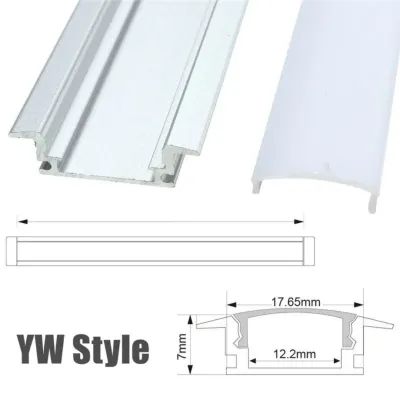
Recessed profiles, on the other hand, are designed to sit flush with the mounting surface for a completely seamless, integrated look. Installing them requires routing a channel into wood furniture or cutting a precise slot into drywall. Once installed, the flanges of the profile cover the rough cut edges, leaving only the flat diffuser visible. This architectural approach is highly rewarding but demands careful pre-planning, specialized tools, and permanent structural alterations.
Corner profiles, typically featuring a 45-degree angled back, are engineered specifically to fit into 90-degree intersections. Whether placed where a wall meets the ceiling, inside the corner of a room, or under a shelf overhang, these profiles project light outward at an angle rather than straight ahead. This directional output is highly effective for creating soft, indirect ambient washes that bounce off adjacent surfaces rather than shining directly into your eyes.
Matching Profiles to Gaming Room Locations
Designing an effective gaming room layout requires strategic zoning. How light behaves in different parts of the room affects both your visual comfort during gameplay and the overall aesthetic of your setup. Factors such as light direction, glare control, and physical protrusion must guide your placement decisions to ensure your lighting enhances, rather than distracts from, your screen.

Desk Edges, Monitor Backlighting, and Under-Shelf Lighting
The immediate area surrounding your gaming desk is where you spend the most time looking, making glare control and physical clearance critical. For desk edges and monitor backlighting, surface-mount profiles are highly practical. They can be easily secured under desk lips or behind monitor mounts using non-destructive adhesives or small mounting brackets. This keeps the light source hidden while casting a soft glow onto the wall behind your screen, which helps reduce eye strain during late-night gaming sessions.
If you have shelves directly above your monitor, mounting a corner profile along the front underside edge allows you to direct light backward toward the wall or downward onto the desk surface. This 45-degree angle ensures the light does not shine directly into your eyes while you are seated.
When installing profiles near your desk, always check for physical clearance. Ensure the profile does not interfere with moving parts, such as adjustable monitor arms, keyboard trays, or reclining gaming chairs. Additionally, verify that the aluminum profile has sufficient space for heat dissipation, especially when mounted close to sensitive PC components or gaming consoles that generate their own thermal load.
Wall Accents, Shelving, and Display Cabinets
Creating clean lines of light across your walls or inside display cases can elevate a gaming room from a simple bedroom setup to a high-end gaming sanctuary. Recessed profiles are the premier choice for wall accents and custom shelving. By embedding the profiles flush into drywall or wooden display cabinets, you create striking geometric light paths that do not protrude into your physical space. This is particularly beneficial in tight gaming corners or narrow walkways where protruding surface mounts could easily be bumped or damaged.
However, if you live in a rented condo or have solid concrete walls—a common structural feature in many Philippines homes—routing channels for recessed profiles is often impossible. In these scenarios, slim surface-mount profiles serve as an excellent alternative. They can be aligned neatly along baseboards or behind furniture to mimic the look of recessed lighting without the structural damage.
When lighting display cabinets filled with collectibles or glass shelves, pay close attention to your diffuser selection. A clear diffuser will reveal individual LED “dots” and create harsh reflections on glass and plastic surfaces. Opting for a deep-channel profile paired with a high-quality frosted diffuser helps blend the individual light points into a smooth, continuous neon-like beam, protecting your collectibles from direct glare and enhancing their presentation.
Ceiling Lines, Coves, and Room Perimeters
Overhead lighting provides the foundational ambient glow for your entire gaming room. For ceiling perimeters, corner profiles are exceptionally well-suited. Placing them at the junction where the wall meets the ceiling allows you to bounce light off both surfaces, creating a soft, indirect cove lighting effect. This indirect illumination fills the room with color without casting harsh shadows or creating distracting reflections on your monitor screen.
For those undergoing a complete room renovation or working with drop ceilings, recessed profiles can be used to create minimalist, flush-mounted light paths across the ceiling. This design keeps the ceiling line perfectly flat and modern.
Regardless of the profile type you choose for overhead installation, safety must be your primary concern. Working at heights requires careful preparation. Ensure you isolate the power before handling any electrical connections. Use secure mechanical fasteners, such as toggle bolts for drywall or masonry anchors for concrete ceilings, rather than relying solely on adhesive tapes which can degrade over time in warm, humid tropical climates. Always verify the weight limits of your mounting hardware to prevent any risk of the profiles falling.
Key Installation and Compatibility Checks
Before purchasing your profiles and LED strips, you must perform several critical electrical, structural, and thermal verifications to ensure a safe and durable installation.
First, verify electrical compatibility. Ensure your LED strips, power supplies, and controllers are fully matched in voltage—typically 12V or 24V systems. Mixing voltages can lead to immediate component failure or fire hazards. If you are using advanced RGB or RGBIC addressable strips, check that the inner width of the aluminum profile is wide enough to accommodate the strip. Addressable strips are often wider and thicker than standard single-color strips due to their onboard chips.
Second, assess your structural limits. Examine the materials of your walls and ceilings. Drywall and wood are highly accommodating for recessed routing, whereas concrete, brick, or hollow blocks require specialized masonry tools and are generally better suited for surface-mount or corner profiles.
Third, prioritize thermal management. Aluminum profiles act as heat sinks that draw warmth away from the LED chips, extending their lifespan and preventing color shifting over time. Check the profile’s aluminum thickness and heat dissipation capacity against the wattage of your LED strips. High-wattage strips require thicker aluminum channels to prevent overheating, which can degrade both the adhesive backing of the strip and the plastic diffuser cover.
Finally, recognize your professional boundaries. While mounting profiles and sticking LED tape are manageable DIY tasks, any work involving fixed electrical wiring, installing new breakers, running cables behind walls, or modifying structural ceiling supports requires a qualified professional. Always consult a licensed electrician to ensure your setup complies with local electrical safety standards.
Decision Framework: Which Profile Should You Choose?
To finalize your gaming room lighting plan, use this conditional framework to match your practical constraints with the right profile type:
- Choose Surface-Mount if: You are renting your space, want a straightforward DIY installation, or are mounting lights onto hard surfaces like concrete walls or finished metal desk frames. This option requires minimal tools and preserves your surfaces.
- Choose Recessed if: You are undergoing a renovation, building custom wooden gaming furniture, or want a premium, flush architectural look. This path requires the ability to route or cut into your mounting materials and is a permanent modification.
- Choose Corner if: You want to wash walls or ceilings with indirect light from 90-degree intersections, or need to mount lights under shelves and desk overhangs where directing the light away from your eyes is necessary for visual comfort.
- Verify First if: Your chosen LED strip is exceptionally wide or high-wattage, your mounting surface is exposed to high humidity, or you are planning complex overhead installations. Whether you are budgeting ₱500 for a simple desk setup or ₱5,000 for a complete room perimeter, always ensure your power supply capacity matches your total strip wattage and that your mounting hardware is rated for the weight of the profiles.
Frequently Asked Questions (FAQ)
Can I paint or customize the exterior of an aluminum LED profile?
Yes, you can paint the exterior of an aluminum profile to match your gaming room’s color scheme, but you must follow specific steps to avoid damaging the system. Always use a primer specifically formulated for aluminum surfaces before applying your topcoat. Be extremely careful to keep paint off the interior channel where the LED strip is mounted, as paint can act as an insulator and severely hinder the profile’s heat dissipation capabilities. Additionally, never paint the plastic diffuser cover, as this will block or distort the light output.
How do I clean dust from frosted diffusers without scratching them?
To maintain optimal light diffusion and brightness, clean your frosted diffusers regularly using a dry or slightly damp microfiber cloth. For stubborn dust or fingerprints, use a mild, non-abrasive soap solution. Avoid using harsh chemical solvents, alcohol-based cleaners, or abrasive scrubbing sponges, as these can permanently cloud, scratch, or degrade the polycarbonate or acrylic diffuser covers, ruining the smooth neon effect of your gaming lights.

Community discussion
Share your experience or ask a question. Comments are reviewed before publication.