
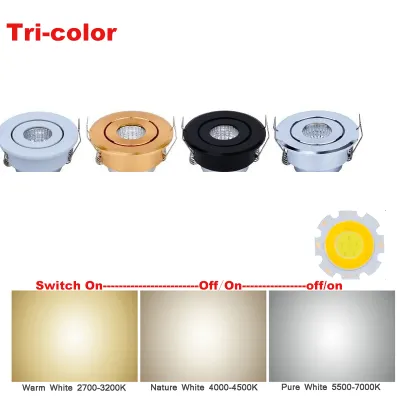
When shopping for recessed ceiling lights, you will frequently encounter the terms COB (Chip on Board) and tri-color. COB technology clusters multiple LED chips into a single module, producing a concentrated, uniform beam of light that minimizes glare compared to older multi-dot LED panels. Tri-color functionality allows you to cycle through warm, neutral, and cool white tones using your existing wall switch. While these features offer excellent versatility, finding the right fixture requires looking beyond wattage; instead, you must prioritize light output (lumens), color rendering index (CRI), beam angle, and physical cutout dimensions to ensure the lights perform well in your home.
What COB and Tri-Color Actually Mean for Your Ceiling
To choose the right recessed lighting, it helps to understand how Chip on Board (COB) technology differs from Surface Mounted Device (SMD) technology. Traditional SMD fixtures feature multiple individual LED chips spread across a circuit board, which often creates a visible “dotted” pattern and a highly diffused, wide-angle light. In contrast, a COB LED packs numerous diodes into a single, highly concentrated module covered by a uniform phosphor coating. This design creates a single, clean point of light that mimics traditional halogen spotlights, offering excellent glare control and a more focused beam. However, because COB chips concentrate light and energy into a small footprint, they also concentrate heat, making high-quality thermal management essential.
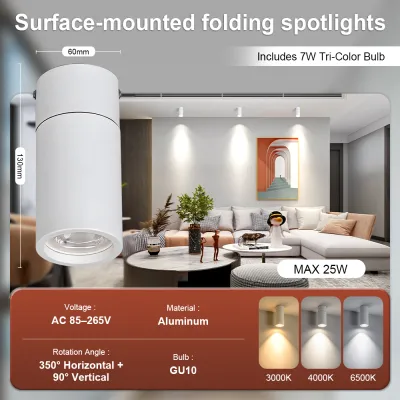
The tri-color feature adds functional flexibility by housing multiple sets of LEDs—usually warm and cool diodes—within the same COB module. Toggling your standard wall switch off and on within a few seconds cycles the internal driver through three preset color temperatures: warm white (around 3000K), neutral white (around 4000K), and cool white (around 6000K to 6500K). This eliminates the need for smart home hubs, allowing you to adjust the room’s ambiance instantly.
Products mentioned in this guide
Prices are valid at publication and may change. Please refer to the product page for the latest price.
Despite their convenience, tri-color COB lights have operational limitations. Because color cycling relies on rapid power toggling, flipping the switch inconsistently can cause fixtures on the same circuit to fall out of sync, leaving one light on cool white while another remains on warm white. Additionally, these fixtures require compatible internal drivers, meaning you cannot easily mix different brands on a single circuit without risking synchronization issues.
The Specifications That Genuinely Affect Lighting Quality
When comparing tri-color COB downlights, relying solely on wattage to estimate brightness is a mistake. Wattage only measures electrical power consumption, not light output. Instead, look at the lumens rating on the product label to determine actual brightness. Modern LED efficiency varies widely, so checking the lumens-per-watt ratio helps you identify fixtures that deliver high brightness without drawing excessive electricity.

Another critical metric is the Color Rendering Index (CRI), which measures how accurately a light source reveals true colors compared to natural sunlight. For living spaces, look for fixtures with a CRI rating of Ra 80 or higher. A rating of Ra 90+ is ideal for spaces where color accuracy matters, such as over kitchen countertops or vanity mirrors, whereas lower CRI ratings can make home interiors look dull or unnaturally gray.
Beam angle is particularly important for COB lights because of their directional nature. Unlike wide-angle SMD panels that flood an entire room with highly diffused light, COB fixtures typically offer narrower beam angles ranging from 24 to 60 degrees. A narrow beam (24 to 36 degrees) is excellent for task lighting, while a medium beam (45 to 60 degrees) provides balanced downlight for general room illumination. This distinction prevents you from accidentally creating harsh shadows or dark spots.
Sizing, Cutouts, and Electrical Compatibility
Before purchasing any recessed fixtures, verify the physical dimensions of your ceiling structure. The most critical measurement is the cutout size—the actual diameter of the hole in your ceiling—rather than the outer bezel size. Installing a fixture with a cutout requirement larger than your existing ceiling hole requires messy drywall modifications, while a cutout that is too small leaves visible gaps around the bezel.
Electrical compatibility is equally vital, especially in regions like the Philippines where the standard mains voltage is 220V to 240V at 60Hz. Check the product specifications to ensure the integrated or external LED driver is rated for this specific voltage and frequency. Using a driver designed solely for 110V systems will cause immediate component failure and pose a serious fire hazard.
Dimming compatibility is another common pain point for tri-color COB lights. Standard wall dimmers work by chopping the electrical current to reduce brightness, which frequently interferes with the electronic driver responsible for cycling the color temperatures. If you plan to dim your lights, verify that both the LED driver and the tri-color mechanism are explicitly labeled as dimmable, and consult the manufacturer’s compatibility chart.
Finally, account for heat dissipation clearance within your ceiling cavity. In warm, humid tropical climates, heat traps easily inside enclosed ceiling spaces, especially under uninsulated roofs. COB lights rely on aluminum heatsinks on the back of the fixture to draw heat away from the delicate LED chips. Ensure there is adequate clear airspace around and above the heatsink, and never cover the fixture with ceiling insulation unless it is explicitly rated for direct insulation contact.
When to Call a Professional for Installation
While replacing an existing, plug-and-play recessed light can sometimes be a straightforward task, installing new COB fixtures often involves fixed wiring that requires a licensed electrician. Any task that requires running new electrical cables through your ceiling, cutting new holes in concrete or gypsum boards, or connecting fixtures directly to your home’s main distribution panel falls outside the scope of safe DIY work.
If you are performing basic maintenance or replacing a compatible fixture, always prioritize safety by turning off the main circuit breaker at the panel board. Use a reliable non-contact voltage tester to verify that the wires are completely dead before touching any connections. Never rely solely on the wall switch to isolate the power, as some older homes may have improper wiring where the switch only cuts the neutral wire, leaving the live wire active.
Stop work immediately and consult a professional if you encounter outdated wiring, a complete lack of grounding wires in your ceiling boxes, or signs of moisture and water leaks near your electrical conduits. Additionally, if you are unsure of your ceiling’s structural integrity or how to safely route cables around structural joists, hiring a qualified professional ensures your installation complies with local electrical codes.
Frequently Asked Questions (FAQ)
Can I use a standard dimmer switch with tri-color COB lights?
In most cases, standard wall dimmers conflict with the electronic drivers in tri-color COB lights, leading to flickering, buzzing, or a failure to change color temperatures. To dim these fixtures safely, you must purchase a model specifically labeled as dimmable and pair it with a compatible dimmer switch recommended by the manufacturer. Alternatively, some modern systems use dedicated smart switches or remote controls to separate the dimming and color-changing functions.
Do tri-color COB lights remember the last color setting?
Whether a tri-color COB light retains its last color setting depends entirely on the design of its internal driver. High-quality drivers feature a memory function that saves your preferred color temperature if the light remains off for more than a few seconds. However, budget-friendly fixtures often lack this memory chip and will reset to a default color every time you turn them off, requiring you to cycle through the switch options again. Always check the product packaging or manual to verify if a memory function is included.

Community discussion
Share your experience or ask a question. Comments are reviewed before publication.